Assigning or Reassigning Entitlement Coverage
Select and apply entitlement coverage from a warranty or service contract, or confirm No Coverage for a Service Product or Work Plan.
Entitlement coverage must be assigned for each Service Product and Work Plan individually. Review the available coverage options and make a selection for each item.
To assign or reassign entitlement coverage for Service Products and Work Plans:
1. Open the Work Order and launch Assign Entitlement.
2. Review the entitlement coverage displayed for each Service Product and associated Work Plan.
3. For each Service Product and Work Plan, select one option:
◦ Select the service contract, if one is available.
◦ Select the warranty, if one applies.
◦ If no coverage applies, select the No Coverage option.
If the system suggests a coverage based on configured entitlement rules, you may override the suggested selection by choosing a different option. When multiple entitlement records qualify, the system may suggest a coverage based on configured entitlement rules. You may override the suggested selection.
4. After selecting coverage for all items that require a decision, click Assign Entitlement.
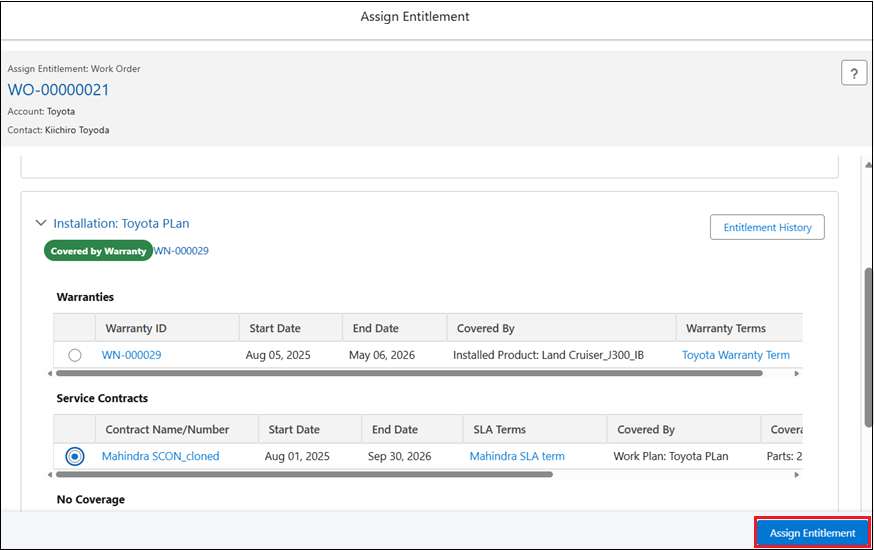
5. Verify the assignment result:
◦ A confirmation message is displayed.
◦ The selected coverage is saved and entitlement status indicators are updated in the view.
◦ The Entitlement Notes field updates automatically with the latest coverage details.
◦ If you entered text in the User Notes field, those notes are saved separately to the service product or work plan record.
◦ All assignment and reassignment actions are time stamped and recorded for audit tracking.
6. If coverage changes are needed later, return to the Assign Entitlement view, select a different option for the affected Service Product or Work Plan, and click Assign Entitlement again.
The new assignment replaces the previous one, and any previously entered User Notes remain available for review, update, or removal.
The Assign Entitlement button is enabled only when all of the following conditions are met:
• At least one Service Product or Work Plan appears in the entitlement view.
• At least one entitlement option or the No Coverage option is available.
• You have permission to assign entitlement coverage.
• A selection has been made for every Service Product and Work Plan that requires a decision.
If any of these conditions are not met, the button remains disabled. These conditions apply when assigning coverage for the first time and when reassigning coverage.
 |
Selecting No Coverage indicates that the Service Product or Work Plan is not covered. You can add User Notes to document the reason for selecting this option. For more information, see Adding User Notes During Interactive Entitlement.
|