Adding Covered Work Plans in 25.1
You can add service or logistic work plans as covered work plans for a Service Contract. These work plans are considered when user performs an entitlement check. Based on the entitlement rule, the engine evaluates and displays appropriate Service Contract coverage during work plan entitlement.
To add a covered work plan to a service contract:
1. From the Home page, go to the Service/Maintenance Contracts.
2. Click the Contract record for which you want to add a covered work plan.
3. In the Related tab, go to the Covered Work Plans and click New.
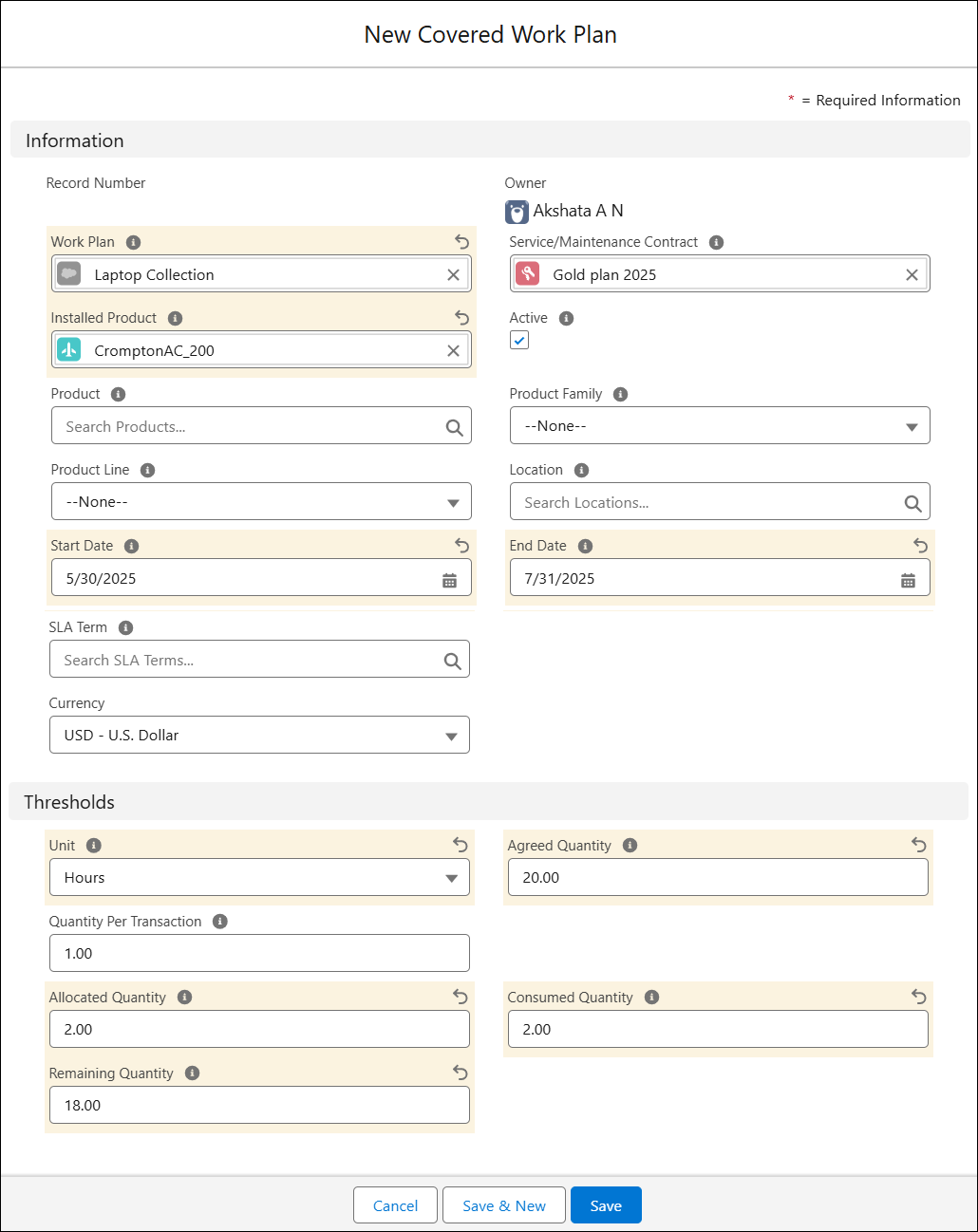
The New Covered Work Plan pop-up window is displayed.
Or, Invoke standard SFM Edit coverage. It will list the Covered Work Plan as related child object.
4. Configure the fields as described in the following table:
|
Field
|
Description
|
||
|---|---|---|---|
|
Work Plan
|
Search and select the Work Plan you want to add to the Service Contract.
|
||
|
Installed Product
|
Select the installed product that you want this work plan to cover.
|
||
|
Product
|
Select the product that you want this work plan to cover.
|
||
|
Active
|
Select this checkbox to consider the covered work plan for entitlement.
|
||
|
Start Date
|
Enter the coverage’s start date.
|
||
|
End Date
|
Enter the coverage’s end date.
|
||
|
Location
|
Select the location that you want this work plan to cover.
|
||
|
Unit
|
Select the unit based on which you want to offer the service. The Unit can be Hours, Count, Credits, or Amount.
|
||
|
Agreed Quantity
|
Enter the number of services agreed to be provided under this work plan.
|
||
|
Quantity Per Transaction
|
Indicates the Quantity that must be allocated with each successful entitlement. Default value is 1. For example, 4 Hours must be allocated with each entitlement check, where Unit is Hours.
|
||
|
Allocated Quantity
|
Indicates the number of services allocated after a successful Work Plan entitlement. This is automatically updated after the entitlement.
|
||
|
Remaining Quantity
|
Indicates the number of services remaining after a successful Work Plan entitlement. This is automatically updated after the entitlement.
|
||
|
Consumed Quantity
|
Indicates the total number of services consumed upon work plan completion. This is automatically updated upon work plan completion.
|

5. Click Save.