Using the Blocking Filter to Identify Dependent Tasks
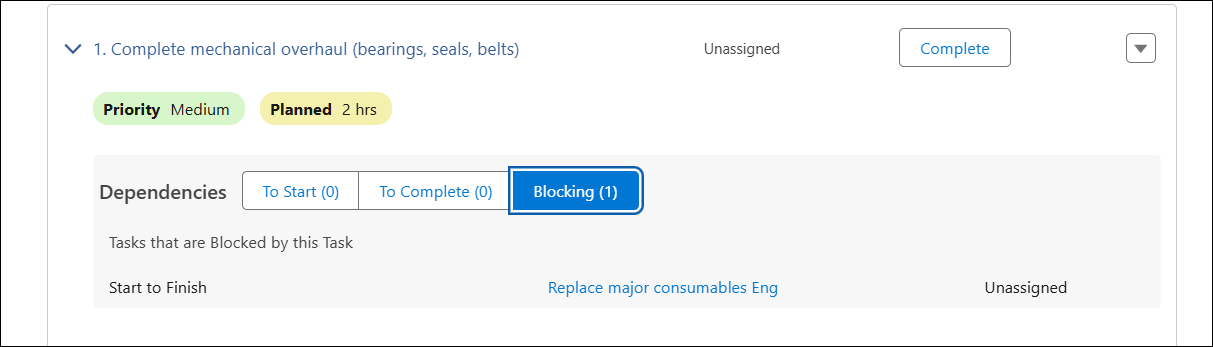
Tasks that depend on the current task are listed under the Blocking filter in the Dependencies section to help service engineers identify blocking tasks and understand their impact on the schedule. This information enables engineers to follow the planned sequence of work rather than starting or completing tasks prematurely. For example, if the current task is overdue, dependent tasks may also fall outside the scheduled timeline due to the dependency.
To unblock tasks by executing a service task:
1. From the Home page, go to the Work Order tab.
2. Open a Work Order record.
3. Click the Service Products & Tasks tab.
Associated service products, service tasks, or work plans are displayed.
4. Expand the General Tasks section or a Work Plan under the Service Products section to view service tasks.
5. In the Dependencies section, click Blocking to view tasks that depend on the current task.
6. Update the current task status based on the dependency condition:
◦ For Start to Start and Start to Finish: Change the Status from New to the required status.
◦ For Finish to Finish and Finish to Start: Set the Status to Complete
7. Click Save.
Dependent tasks are unblocked and can proceed for execution.
Use Case
Unblocking dependent tasks to continue work execution
Role: Technician
A technician at Iniscope International opens a work order with the Soniscape SSI 1000 Maintenance Plan that includes multiple tasks with dependencies. The technician reviews the Dependencies section and identifies which tasks are currently blocking others. When the technician marks the current Hardware Installation task as Complete, the system immediately unblocks the dependent Calibration task, allowing the technician to proceed with the next task. By viewing the blocking relationships before completing each task, the technician avoids attempting to start blocked tasks and maintains proper execution sequence, reducing rework and improving on-site efficiency.