Ordering Parts Based on Recommended Parts
As a service engineer, you can order the recommended parts you need to complete the work order.
To order parts, perform the following steps.
1. In a Work Order record, navigate to the Work Plans tab.
2. Expand the work plan for which you need to manage parts.
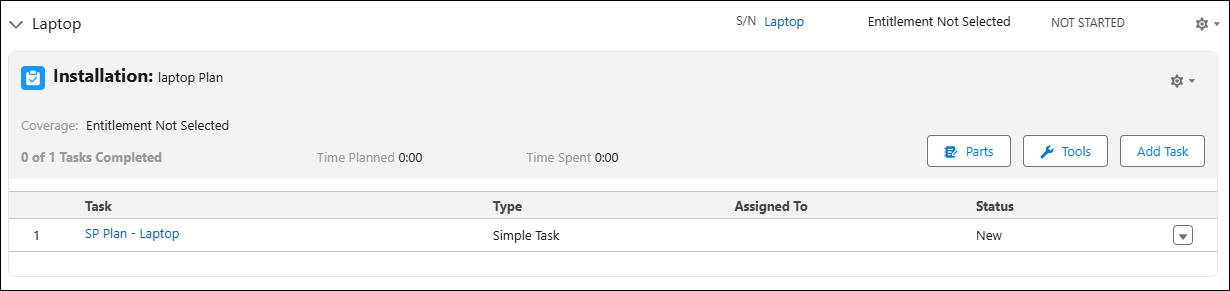
3. Click Parts.
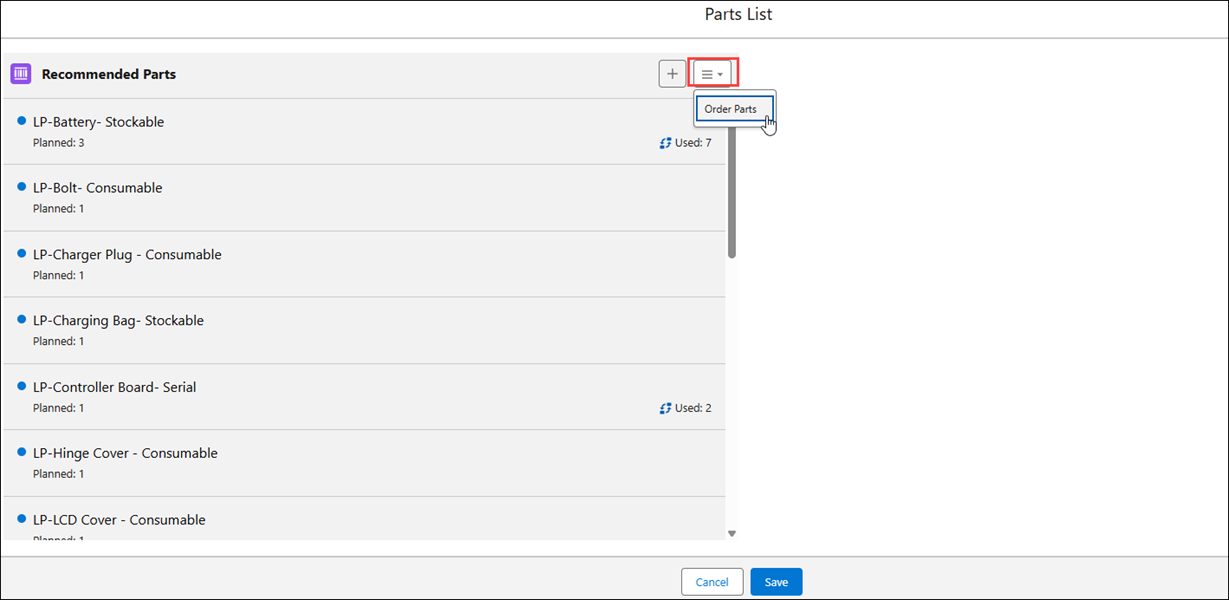
The Parts List window is displayed, with all the recommended parts for the work plan.
 |
The list of recommended parts is displayed with the following details:
• planned quantity required for the service product
• used or consumed quantity from the inventory
• a red flag if the planned quantity is more than the available quantity in the inventory for a stockable part. The available quantity is referred to as On Hand quantity.
|
4. From the menu option, click Order Parts. The configured SFM in Part Setting page is launched in a new tab.

|
|
The option is available if your administrator has configured an SFM in the Order Recommended Parts field. If this field is left blank, the Order Parts option is not available to you. Also, all the recommended parts are carried forward to the SFM screen.
|
5. In the Parts Order Line section, select the required parts.
6. Enter the required quantity and the expected receipt date for each part.
7. Delete parts that are not required.
8. Click Save on top of the screen. A confirmation message is displayed after successful validation, and you are redirected to the Part Order page.
9. Go back to the Parts window from where the Parts Ordering window was launched, and then close the modal.
|
|
When you update part information for service tasks, the part consumption process flow is triggered as per the configurations set in Part Setting Configuration. This feature helps ensure accurate consumption and tracking of parts.
|