Completing a Task with Dependencies
To complete a task that has dependencies, you must satisfy the dependency conditions defined for the task.
For Start to Finish dependencies, ensure the primary task status is not New.
For Finish-to-Finish dependencies, ensure the primary task status is Complete or Cancelled.
You cannot complete the current task until the dependency conditions are met.
1. From the Home page, go to the Work Order tab.
2. Open a Work Order record.
3. Click the Service Products & Tasks tab.
Associated service products, tasks, or work plans are displayed.
4. Expand the General Tasks section or a Work Plan under the Service Products section to view tasks.
Tasks with dependencies is displayed with the Blocked status.
5. Expand a task with Blocked status.
6. In the Dependencies section, click To Complete to review the primary tasks required to complete the current task.
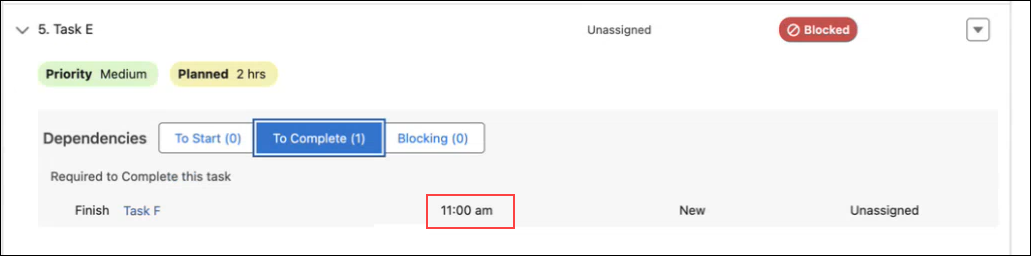
The dependency details include dependency type, task name, task status, estimated completion time, and assigned user.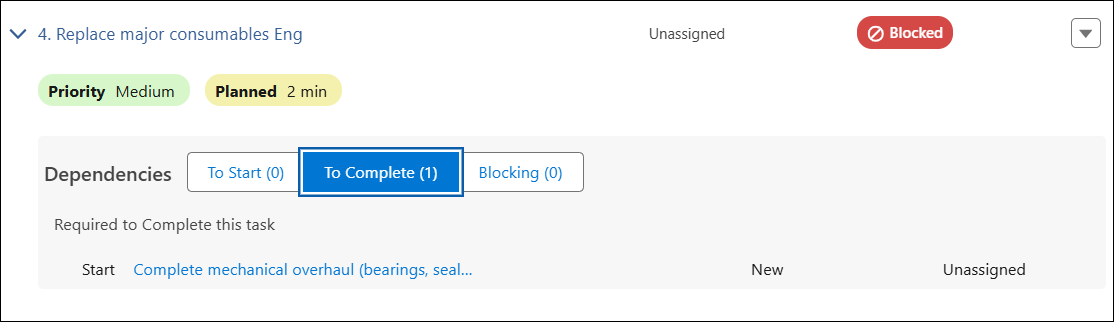
The Estimated Completion Time is the sum of the Estimated Duration and the Scheduled Date and Time defined for the task in the Work Plan Assignment record. It is displayed only when the dependency is not met. If the scheduled date is the current date, only the time is displayed.
7. Click a related task to open it.
8. Update the Status of the task based on the dependency type:
◦ For Start to Finish, set the status to a value other than New.
◦ For Finish to Finish, set the status to Complete or Cancelled.
9. Return to the current task.
In the task details, The Complete option is enabled under the Status field.
10. Change the Status to Complete.
11. Click Save.
After you complete the primary task, the Completion Time and Completed By details are displayed in the Dependencies section.
Use Case
A field technician at Iniscope service organization performs corrective maintenance on CNC machines.
Service planners configure the CNC Machine Repair Work Plan with task dependencies to ensure tasks are completed in the correct sequence. For quality compliance, the planner defines that quality check must be completed before repair completion using a Finish to Finish dependency.
On 20 May 2026 at 4:30 PM, the technician completes the repair activity and attempts to close the task.
The technician reviews the tasks with the following details:
• Task 1: Quality Check (Primary task)
• Task 2: Repair Completion (Current task)
• Dependency type: Finish-to-Finish
Once the technician attempts to mark the Repair Completion task as complete, the system checks the configured dependency.
The system verifies whether the primary task (Quality Check) has a status of Complete or Cancelled. Since the Quality Check is still in progress, the completion action remains disabled.
As a result, the technician completes the Quality Check task by updating its status to Complete.
When the technician returns to the Repair Completion task, the Mark as Complete option or Complete status option is enabled.
This ensures tasks are completed only after required validations, improving service quality and accuracy.