Adding Translations for a Work Plan and its Related Tasks
Add translated text for a work plan and its related tasks using the Manage Translations page.
You can add translations for a Work Plan, including Work Plan Name, Work Plan Description, Task Name, and Task Instructions.
To add translations for a Work Plan and its related tasks:
1. From the Home page, go to ServiceMax Setup > Work Plan Management > Manage Translations.
The Manage Translations page is displayed.
2. Provide values for the fields as described in the following table:
|
Field
|
Description
|
|---|---|
|
Work Plan
|
Search for and select a specific work plan to add translations for the work plan and its related tasks.
|
|
Language
|
Select the language for which you want to add translations. For example, French.
|
|
Type
|
Filter translation records by type, such as Task Name, Task Instructions, Work Plan Name, Work Plan Description, or All. By default, All is selected after you select a Work Plan.
|
|
Search
|
Search translation records using keywords that displays matching entries based on the master text.
|
|
Copy Master Text
|
Copy the Master Text to the Translated Text to quickly modify the text instead of entering the translation from scratch. This is optional.
|
3. For each Type, enter the appropriate translated text in the Translated Text column. For example, add a translated text for Work Plan Name.
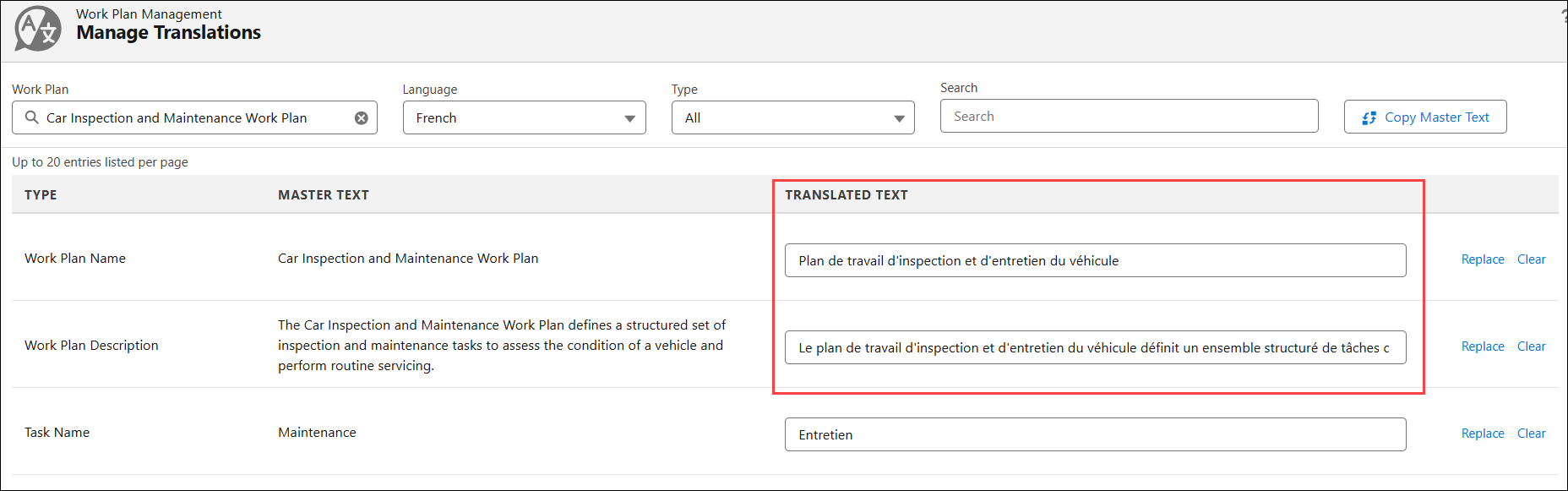
 |
• Click Replace next to a Type to replace the translated text with the master text.
• Click Clear next to a Type to clear the translated text.
|
4. Click Save.
|
|
Click Reset to discard your changes.
|
The translated text is displayed when technicians or planners access work plans and related tasks details under Work Orders, Service Products, and Service Tasks lightning tab. For example, the Work Plan Name, Description, and Task Name is displayed in the French language in a Work Order record as highlighted in the following screenshot:
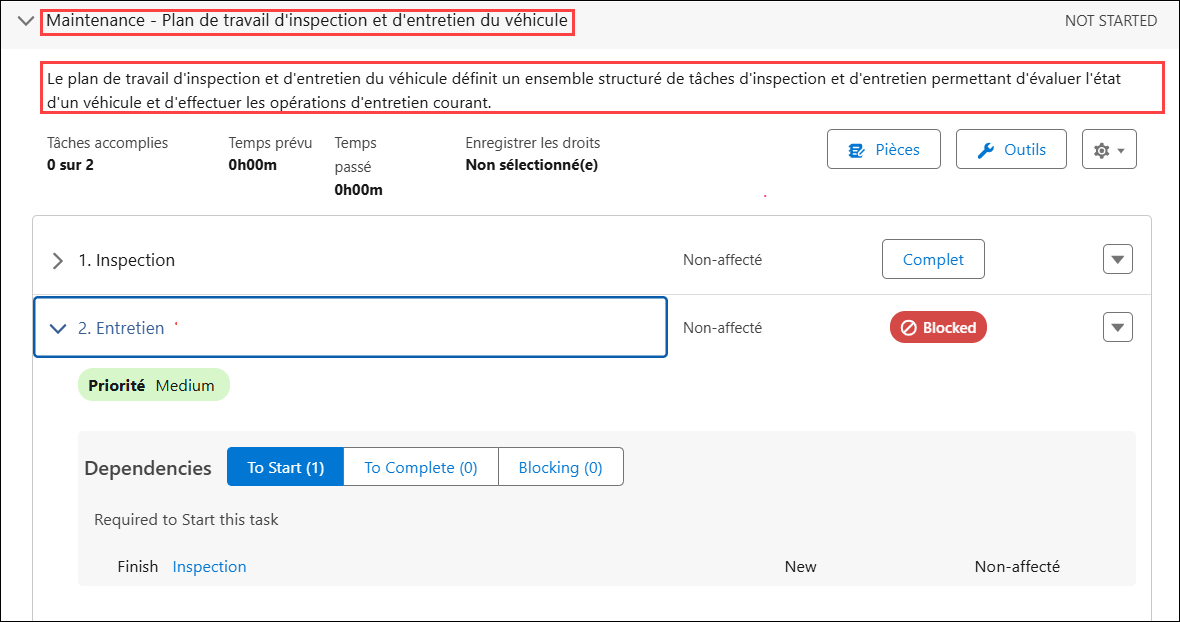
|
|
In the Work Plan Library and Manage Dependencies areas, Work Plan and task details are always displayed in English instead of the user's language.
|
Use Case
Providing translated work instructions to multilingual service teams
Role: Administrator
An administrator at Iniscope International adds French and German translations to the Soniscape SSI 1000 Preventive Maintenance Work Plan so that technicians in France and Germany receive task instructions in their local language. When a technician in Frankfurt opens the work order, the service tasks, instructions, and reference file labels display in German. The administrator manages all translations from the work plan record in the library, eliminating the need for technicians to reference separate translated documents, reducing interpretation errors during service execution, and supporting compliance with local language requirements for medical device servicing in regulated markets.