Adding the AI Action Page Component for Community Users
You can add an AI Action Page component to a Salesforce layout for instant, in-context AI insights. It runs a relevant AI Action and displays the response on the page, so users don't need to open a separate flow or wizard. You can configure the AI Action to run automatically when the page loads or only when a user selects a button. While the AI generates a response, the component shows a loading spinner. Users can rerun the AI Action when needed, and the component displays the results.
 |
The component appears on the Lightning page under Setup > Digital Experiences > All Sites. If there is no AI action for that object on which the component is placed, then the AI Action page component cannot be saved.
|
|
Prerequisites
|
|---|
|
Before adding the AI Action page component for Community users ensure the following:
• The ServiceMax AI package is installed in the target org using the Community‑supported package URLs (Production or Sandbox).
• A Salesforce Community (Experience Cloud site) is already set up, and you have permission to edit its pages in Experience Builder.
• At least one AI Action exists for an object that Community users can access.
• Community user profiles, permission sets, and sharing rules allow access to the relevant objects and AI Actions.
|
To add the AI Action page component, perform the following steps.
1. In Salesforce, go to Setup.
2. In the Quick Find box, enter Digital Experiences > All Sites.
3. Open the Community (site) where you want to add the AI Action component.
4. Click Builder to open the Experience Builder for that site.
5. In Experience Builder, open the page where you want to show AI output. For example, a Work Order detail page or a custom support page.
6. In the Components panel, locate the ServiceMax AI Action component that is enabled for Community use.
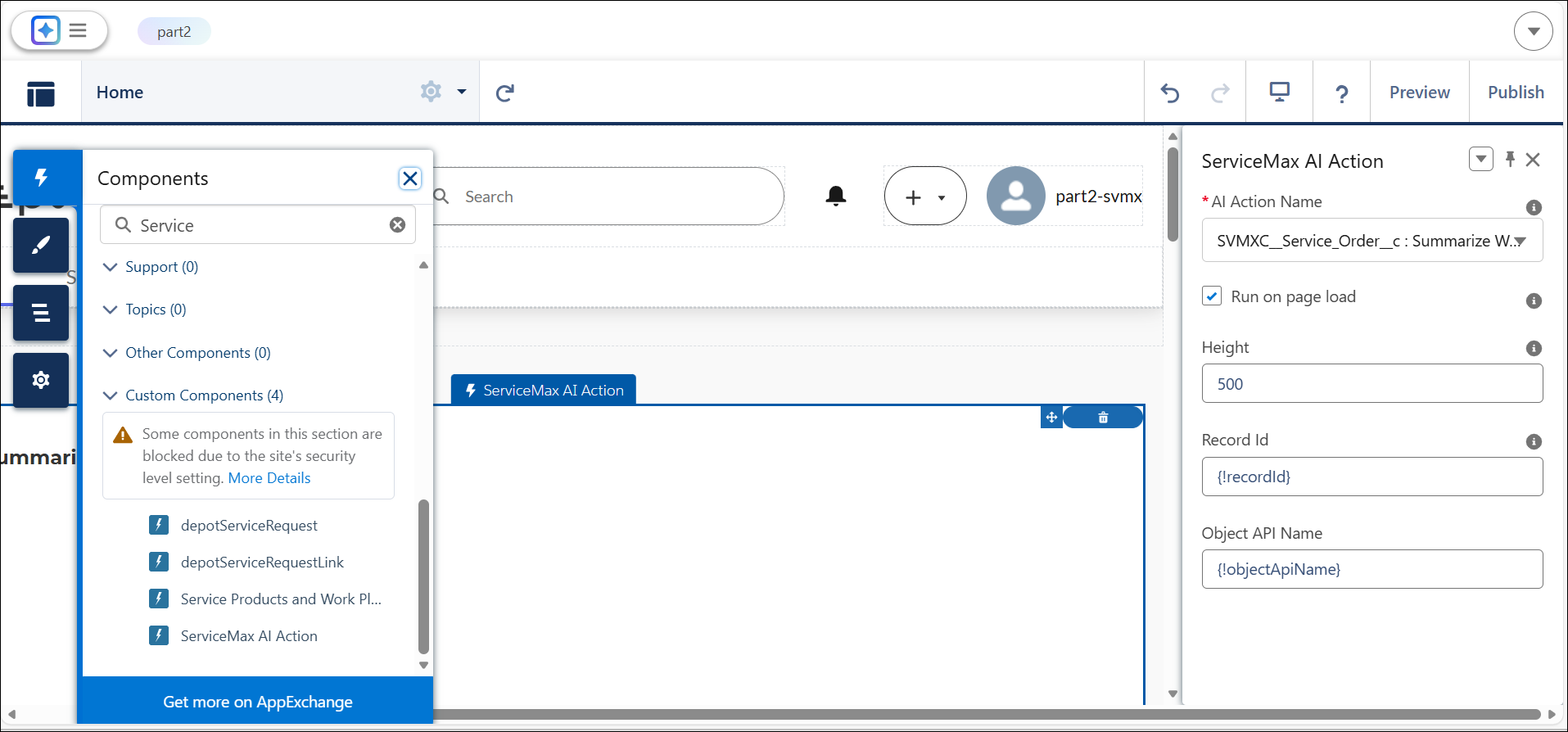
7. Drag the component onto the page in the appropriate region.
8. Select the ServiceMax AI Action component on the page.
9. In the Properties pane, select the AI Action to run.
|
|
Only AI Actions that are compatible with the underlying object and available to Community users are listed.
|
10. In the AI Action Name field, select the AI Action you want the component to run.
11. Select the checkbox for Run on page load to display AI Action results automatically when the record page loads. Alternatively, a Run on page load button appears on the record page to run the AI Action by button click.
|
|
When the AI Action runs (automatically or by button click), the user sees a loading spinner until the response returns.
|
12. Enter the height of the component.
|
|
The default height set for the component is 500.
|
13. Click Save.
14. Navigate to the same record page.
After the response is ready, it appears within the component on the record page.
|
|
An error message appears when you try to add an AI Action on object that does not have AI Actions configured.
|
After the AI response appears, users can select Re-run to refresh the output when record data changes. The component also includes thumbs up, thumbs down, and comments so users can share feedback and help improve AI results.