About Service Principals for Creo+
A service principal (also referred to as a service account) is a specialized identity used by an application, a service, or a resource to securely access resources and perform actions within a computer system or network. For Creo+, the service principal can be considered as a secure user account that runs Creo+ on a remote computer. For example, an Administrator creates a service principal that can be activated and can run Creo+ on a CAD worker machine that also has Creo View adapters for Creo+ installed. Windchill uses the CAD worker machine to remotely publish Creo View data and send the resulting viewables back to the Windchill server.
For more information about the installation and configuration of Creo View adapters, refer to the Creo View Adapter for Creo+—Installation and Configuration Guide.
An Administrator adds service principals to an organization from the PTC Admin Center. Follow the procedure described in the PTC Admin Help Center to create service principals for Creo+.
The Service Principals page on the Creo+ Portal displays a list of all Creo+ service principals available for the organization.
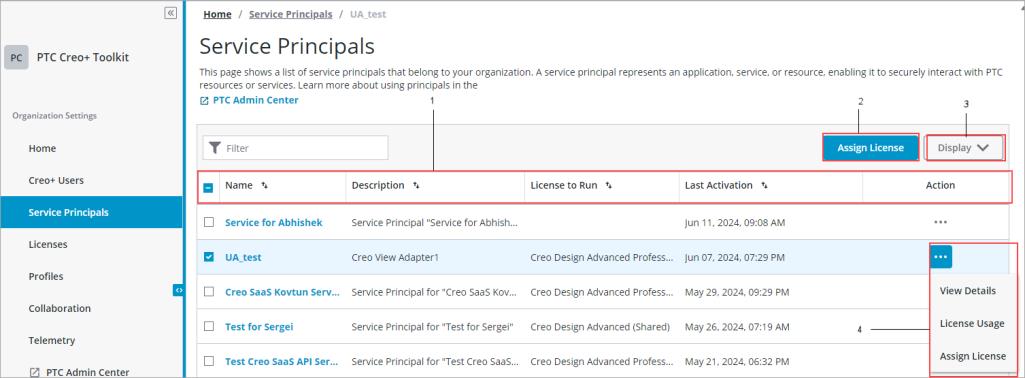
1. Lists the Creo+ service principals for the organization.
2. Assign a license to the service principal.
3. Controls the fields to be displayed
4. Accesses actions on a service principal.
From the Service Principals page on the Creo+ Portal, an Administrator can perform the following actions for a service principal.
• View Details—View detailed information for a service principal
• License Usage—View the license usage of a service principal
• Assign License—Assign a license to a service principal