Generating Using Existing BOMs
Use the  Generate from Existing BOMs action available in the middle pane toolbar of the BOM Transformer to generate similar mBOMs from related upstream similar eBOMs.
Generate from Existing BOMs action available in the middle pane toolbar of the BOM Transformer to generate similar mBOMs from related upstream similar eBOMs.Business Use Case
Consider that a product Product 1.0 is already available in the market. A new product Product 1.1 is derived from Product 1.0. The Product 1.1 is almost similar to Product 1.0, with the exception of some minor changes such as the color or material used to manufacture. The manufacturing process of manufacturing Product 1.0 and Product 1.1 is the same. In such scenario, it is not necessary to perform BOM transformation action again because a reference entity, (in this case, Product 1.0) is already available to you. You can use the existing eBOMs and mBOMs as the initial reference entities and the new eBOM as the input, and then perform the BOM transformation. This approach saves time and effort and increases productivity.
Before using the Generate from Existing BOMs action, ensure that the following entities are available:
Generate from Existing BOMs action, ensure that the following entities are available:• A template eBOM
• A template mBOM
• One or more similar eBOMs
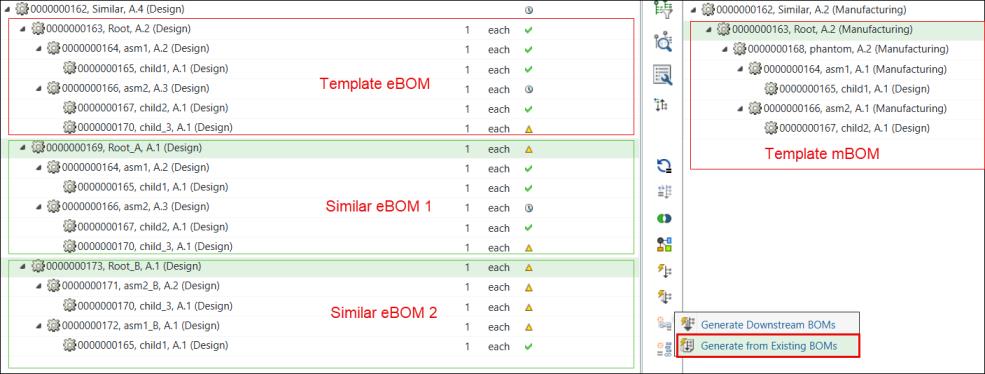
For example, the structure under the part 000000163, Root (Design) is considered as the template eBOM, and the structure under the part 000000163, Root (Manufacturing) is considered as the template mBOM. The structures under the parts 000000169, Root_A, (Design) and 000000173, Root_B, (Design) are considered as similar eBOMs.
You can initiate the Generate from Existing BOMs action by selecting one or more similar eBOMs in the upstream view and the template mBOM in the downstream view.
Logic
1. After you initiate the Generate from Existing BOMs action, the system checks if a link created because of the Save As action exists between the template eBOM and the similar eBOMs. Going forward, consider the name of this type of link as save as link. If a save as link exists, the system looks for the transformation information, and then generates the structure accordingly.
Generate from Existing BOMs action, the system checks if a link created because of the Save As action exists between the template eBOM and the similar eBOMs. Going forward, consider the name of this type of link as save as link. If a save as link exists, the system looks for the transformation information, and then generates the structure accordingly.Certain transformation information is generated when the system transforms a template mBOM from a template eBOM using structure transformational actions. The system uses the template eBOM structure to generate similar eBOMs. The system uses the available transformation information (how and where to transform) to generate similar mBOMs from similar eBOMs. For example, a part is transformed as a new branch between a template eBOM and a template mBOM. In such case, the part corresponding to it in the similar eBOM is also transformed as a new branch in the similar mBOM. The system also maintains the path information from the templates.
2. If the system does not find the save as link, the system checks whether there are matching component IDs between the template eBOM and the selected similar eBOMs. If the matching component IDs are found, the system performs the transformation.
3. If the system does not find the save as link and matching component IDs, the system checks whether the master is the same for the template eBOM and the selected similar eBOMs. If the masters are the same, the system performs the transformation.
Once the implementation of the Generate from Existing BOMs action is complete, the generated structure appears as follows:
Generate from Existing BOMs action is complete, the generated structure appears as follows: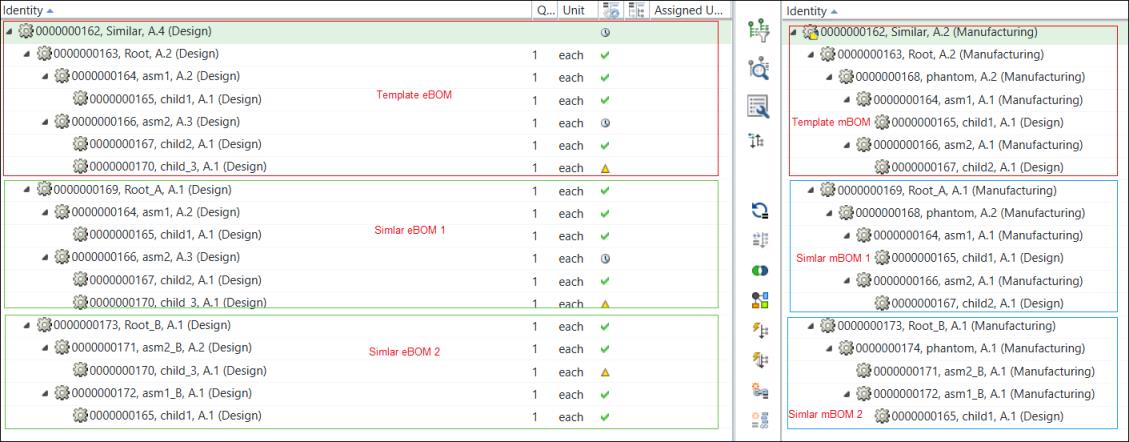
Refer to the following tutorials for more details: