About Resource Utilization Metrics
Time Range Determination
Resource Utilization data are calculated based on the specified time range on the Scheduler Calendar. Typically, when the selected date is updated, the timezone or preset is modified, or users click Today on the Scheduler Calendar, the calculation time range begins at the start of the selected date, and concludes at the end of that date, extended by the chosen preset interval.
When users zoom in or out on the Scheduler Calendar, the time range adjusts to match the visible date range, so that the time range starts at the beginning of the visible start date and ends at the conclusion of the visible end date. If only a portion of a start or end date is visible, the entire date is included in the time range.
 |
Time ranges do not change when infinite scrolling is used.
|
Utilization Metrics Calculation
Available Hours
Available Hours are the amount of time that Resources are accessible within the currently selected time range. This includes both regular Shifts and any Shift Exceptions, as long as the Shift Segment type is supported by the productive_shift_segment_types attribute value specified in the Utilization Settings record.
|
|
• If no Shift is defined or started for a Resource on a specific day, the entire day is treated as Available Hours, for a total of 24 hours.
• If any portions of a Shift or Shift Exception fall within the specified time range, only the duration of those portions is used to calculate Available Hours.
• When the Available Hours value is 0, all percentages are set to 0.
|
Productive Hours and Percentage
Productive Hours are the amount of time spent on Appointments and Events whose event types are supported by the productive_event_types attribute value specified in the Utilization Settings record. Only Appointments and productive Events that occur within the specified time range are used for calculation. If any part of a productive Event falls within the time range, only the duration of those portions are used for calculation.
Productive Percentage is calculated by dividing Productive Hours by Available Hours.
|
|
Final but non-aborted Appointments that occur within the specified time range but do not appear on the Scheduler Calendar are also included in Productive Hours calculations.
|
Non-Productive Hours and Percentage
Non-Productive Hours are the amount of time spent on Events whose event types are unsupported by the productive_event_types attribute value specified in the Utilization Settings record. Only non-productive Events that occur within the specified time range are used for calculation. If any part of a non-productive Event falls within the time range, only the duration of those portions are used for calculation.
Non-Productive Percentage is calculated by dividing Non-Productive Hours by Available Hours.
Travel Time Hours and Percentage
Travel Time Hours are the total duration of time spent traveling to and from Appointments and Events. Only the travel times that fall within the specified time range are used for calculation, as follows:
• Travel To time is the lower value of the Travel To time of the Appointment or Event, and the duration from the start time of the time range to the start time of the Appointment or Event.
• Travel Back time is the lower value of the Travel Back time of the Appointment or Event, and the duration from the end time of the Appointment or Event to the end of the time range.
Travel Time Hours is the sum of the Travel To and Travel Back times for Appointments and Events.
|
|
• Travel times associated with Appointments and Productive Events are included in the Productive Hours value for Resources when the count_travel_time_as_productive option is set to true in the Utilization Settings record.
• Travel times associated with non-productive Events are included in the Non-Productive Hours value for Resources when the count_travel_time_as_not_utilized option is set to true in the Utilization Settings record.
Travel Time Percentage is calculated by dividing Travel Time Hours by Available Hours.
|
Uncommitted Hours and Percentage
Uncommitted Hours are the total duration during which a Resource is idle within the time range. This value is calculated by subtracting the Productive Hours, Non-Production Hours, and Travel Time Hours from the Available Hours for the Resource.
|
|
• Travel Time Hours associated with Appointments and productive Events are not subtracted when the count_travel_time_as_productive option is configured to true in the Utilization Settings record, because Travel Time Hours are included in Productive Hours.
• Travel Time Hours associated with non-productive Events are not subtracted when the count_travel_time_as_not_utilized option is configured to true in the Utilization Settings record, because Travel Time Hours are included in Non-Productive Hours.
|
Uncommitted Percentage is calculated by dividing Uncommitted Hours by Available Hours.
Productive Utilization Breakdown Calculation
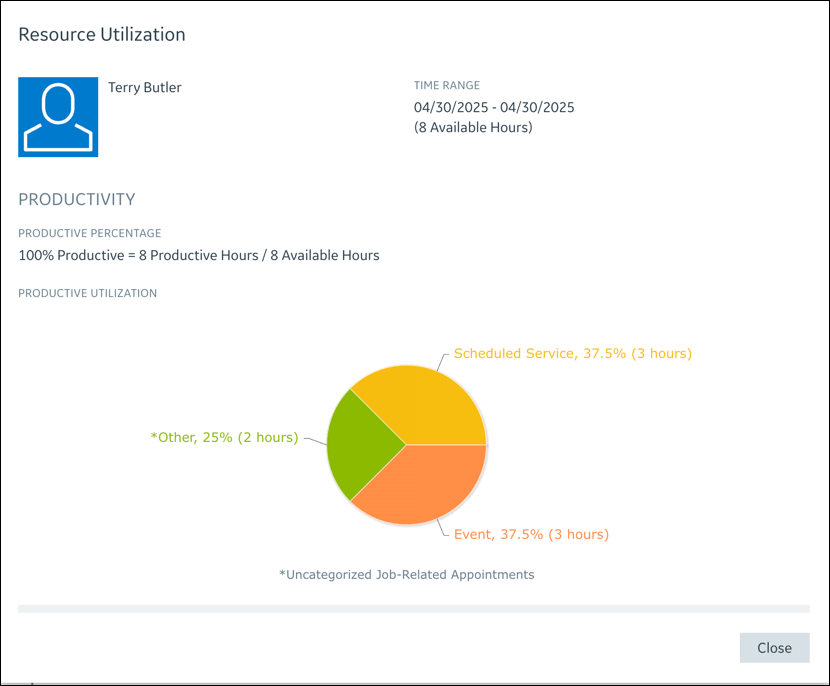
The Job field configured in the productive_summary_field attribute in the Utilization Settings record is used to calculate the breakdown of Productive Utilization data. The logic for this field organizes Appointments based on the respective productive_summary_field values associated with the related Jobs, and calculates the total Productive Hours and Productive Percentage for each group.
In cases where the respective productive_summary_field values associated with the Jobs related to the Appointments are not configured, Productive Utilization is categorized as *Other. Event indicates the Productive Utilization of Productive Events.
Example Calculation
A technician is scheduled for an 8-hour work shift that includes an Appointment that requires 1 hour of travel time and 2 hours of working time. The technician also has a 1-hour call Event followed by a 1-hour meeting Event that requires a total of 2 hours of travel to and travel back from the meeting location. With the preconfigured Utilization Settings record that ships with Service Board, Resource Utilization data are calculated as follows:
• Available Hours: 8 hours
• Productive Hours: 2 (Appointment duration) + 1 (Appointment travel time) + 1 (meeting Eventduration) + 2 (round-trip travel to and from meeting Event) = 6 hours
• Productive Percentage: 6/8 = 75%
• Non-Productive Hours: 1 hour (call Event duration)
• Non-Productive Percentage: 1/8 = 12.5%
• Travel Time Hours: 3 hours
• Travel Time Percentage: 3/8 = 37.5%
• Uncommitted Hours: 8 (Available Hours) – 6 (Productive Hours) – 1 (Non-Productive Hours) = 1 hour
|
|
Travel Time hours are counted into Productive Hours and Non-Productive Hours.
|
• Uncommitted Percentage: 1/8 = 12.5%
• With only one Scheduled Service type Appointment and one Productive Event, the breakdowns are as follows:
◦ Scheduled Service: 2 (Appointment duration) + 1 Appointment travel time = 3 hours
◦ Event: 1 (meeting duration) + 2 (Travel Time Hours for meeting Event) = 3 hours
Each of the above consumes 50% of Productive Utilization.