Defining a Product Structure
|
Prerequisite
|
|---|
|
Ensure that you have the Read and Create permissions on Product object. For more information, see Assigning Permission Sets.
|
The Product Structure allows end users to view the detailed structure of a Product. This helps obtain parts information during servicing, ensuring efficient and accurate maintenance.
You can view the Service BOM for a Product only if the Product and its Parts are clearly defined to determine the type of Product Structure. If your data does not include the required structure types, only the defined Product and its Parts are displayed. Additionally, if the Service BOM type is not specified, the Product Structure is not displayed.
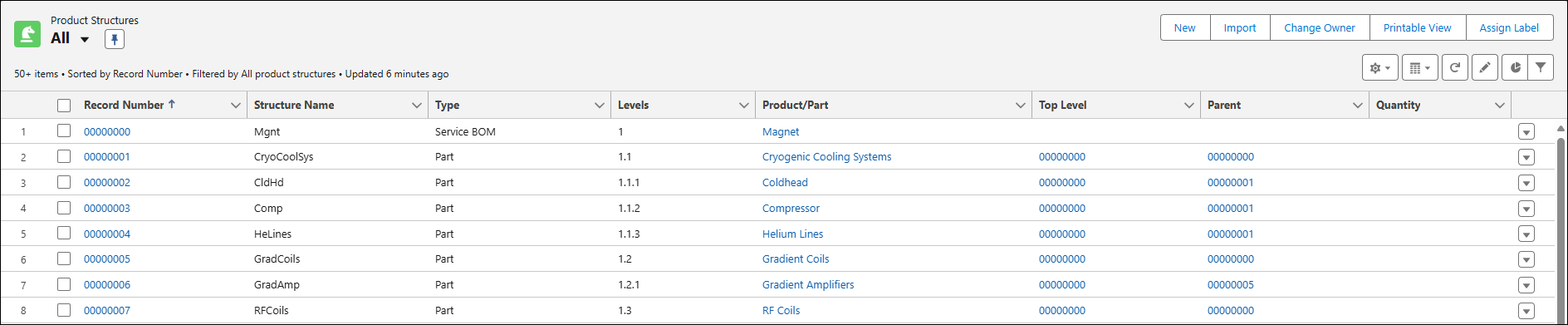
You can define the Product Structure by configuring relevant fields. This setup allows the end users to view the Product Structure as a grid that displays the hierarchical structure of the Product, including all its parts. End Users can quickly access detailed parts information, streamlining the servicing process and reducing downtime.
To define a Product Structure:
1. From App Launcher, type and select Products.
2. Click Product Name or select Edit from the action menu.
3. Navigate to Related tab.
4. Click New in the Product Structure. The New Product Structure window is displayed.
5. Provide the details for the fields as described in the following table.
|
Fields
|
Description
|
||
|---|---|---|---|
|
Structure Name
|
Displays the name of the Product. You can provide the Product name or a unique name.
|
||
|
Active
|
Checkbox to indicate if the Product Structure record is active. Only active records are displayed for the end users.
|
||
|
Type
|
Displays the type of Product Structure.
You can select the following options:
• Service BOM: Select this to define the Product as a top-level.
• Parts: Select this for the rest of the Products in a Product Structure. A part should have both Top Level and Parent fields defined to be part of the Product Structure.
|
||
|
Level
|
Displays the level of the Service BOM or Parts. You can define upto five levels.
For example, if you have a Smartphone as a Service BOM, then you can define its parts upto five levels.
|
||
|
Product/Part
|
Display the lookup to the Product to which this Product Structure belongs.
|
||
|
Top Level
|
Displays the Record Number of the top-level in the Product Structure. This should be always a Record Number of Service BOM in a Product Structure.
|
||
|
Parent
|
Displays the Record Number of the parent Product in a Product Structure.
|
||
|
Quantity
|
Displays the quantity of the Product/Part required.
|
||
|
Calculate Hierarchy
|
Automatically calculates the product hierarchy level whenever a record is created or updated within the Product Structure, ensuring hierarchy levels remain accurate and up-to-date with every change.
For more information on hierarchy levels and per-level record limits for large datasets, see Product Structure Hierarchy Levels and Record Processing Capacity.
|
||
|
Option Set
|
Displays the Option Set associated with this Product Structure. Select an Option Set to define the configurable Options and Option Choices for filtering the Product Structure tree. This field applies only to SBOM type records.
|

6. Click Save.