Creating a Solution Applicability
You can create a Solution Applicability to link a solution with specific products, product lines, product families, or custom fields.
To create a Solution Applicability:
1. Click the App Launcher, type Solution Applicabilities in the search bar, and select it from the results.
The Solution Applicabilities page is displayed.
2. Click New.
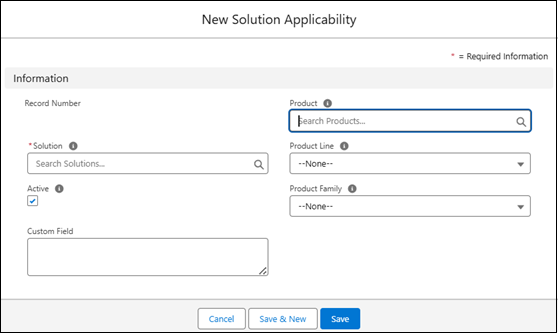
The New Solution Applicability pop-up window is displayed.
 |
You can also add a Solution Applicability for a particular solution. Go to ServiceMax Setup > Investigations > Manage Solutions, select the required solution, select the Related tab, and click New in the Solution Applicabilities section.
|
3. Provide the details for the fields as described in the following table:
|
Field
|
Description
|
||
|---|---|---|---|
|
Record Number
|
Displays the auto-generated Record Number. This field does not appear during creation and is shown only after you save the record.
|
||
|
Solutions
|
Displays the Solution to which Solution Applicability is associated. Search and select a solution from the available list.
|
||
|
Active
|
Indicates if the Solution applicability is active. The checkbox is selected by default.
|
||
|
Product
|
Displays the Product to which the Solution Applicability is associated. Search and select a specific product from the available list.
|
||
|
Custom Field
|
Displays a custom field configured by the administrator. Depending on the setup, it can appear as a text box, lookup field, or dropdown. The field captures additional information related to the Solution Applicability. Enter or select the appropriate value in this field based on your organization’s configuration and data requirements. If the field is a lookup or drop-down, search for or choose the correct value from the available options.
|
||
|
Product Line
|
Displays the Product Line to which the Solution Applicability is associated. Select the relevant product line from the available list.
|
||
|
Product Family
|
Displays the Product Family to which the Solution Applicability is associated. Select the relevant product family from the available list.
|
4. To complete the action, click Save to apply changes, Save & New to add another solution applicability, or Cancel to discard changes.
|
|
The following are the error scenarios when creating a Solution Applicability:
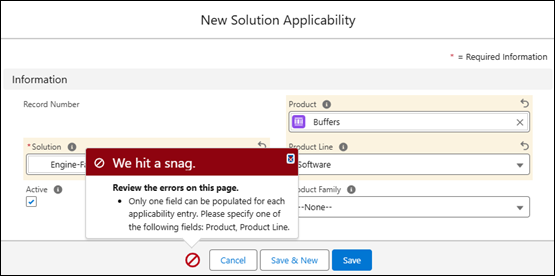
• When creating a Solution Applicability, select only one field (Product, Product Line, Product Family, or Custom Field). If more than one field is selected, the system displays an error.
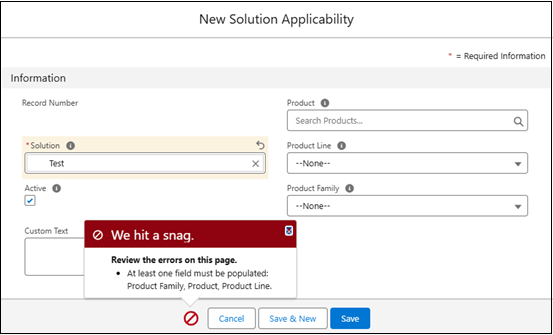
 • If none of the fields Product, Product Line, Product Family , or Custom Field is selected, the system displays an error message and prevents saving the record.
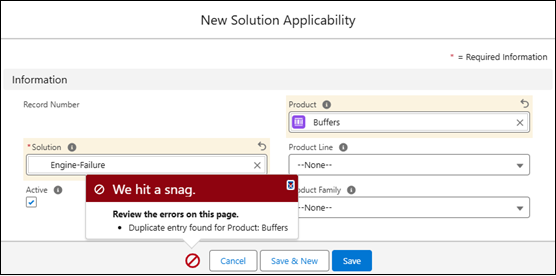
 • If you create a solution applicability with the same Product, Product Line, Product Family , or Custom Field as an existing record, the system displays an error message and prevents saving.
 |