Managing App Configuration
You can use Configuration Management to ensure users run the latest mobile app configuration by notifying them of updates, setting reminder intervals, and enforcing mandatory downloads when required.
To manage Configuration Management settings perform the following steps:
1. Log in to the org using your valid credentials.
2. Navigate to ServiceMax Setup > Mobile > Mobile Console. The Mobile Console screen is displayed.
3. Click Global Settings Manager.
4. In the left navigation pane, under Application Settings, click Configuration Management.
The Configuration Management page is displayed.
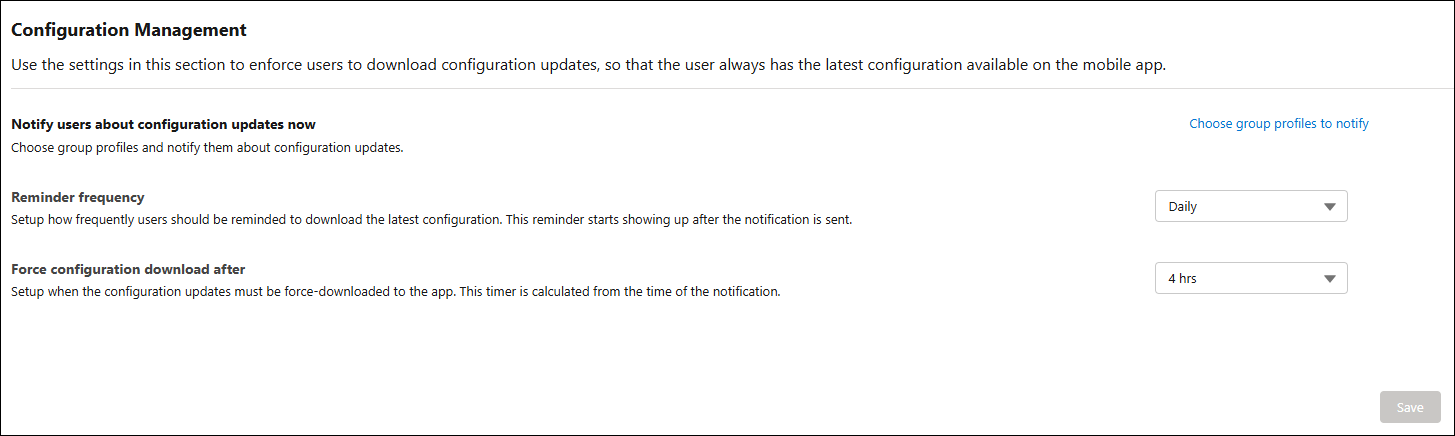
5. Provide the details for the fields as described in the following table.
|
Field
|
Description
|
||
|---|---|---|---|
|
Notify users about configuration updates now
|
Allows you to select group profiles and send notifications to users when new configuration updates are available.
|
||
|
Choose group profiles to notify
|
Opens the group profile selector to specify which user groups receive configuration update notifications.
|
||
|
Reminder frequency
|
Specifies how often users are reminded to download the latest configuration after the initial notification is sent.
|
||
|
Force configuration download after
|
Specifies the time after notification when the configuration update must be force‑downloaded on the mobile app. The timer starts from the time the notification is sent.
|

6. Click Save.
The updated configuration management settings determine how and when users receive configuration updates on the ServiceMax mobile App.