Viewing Usage Summary for Work Plan
The Usage Summary enables you understand how much of the Work Plan benefit is still available under a Service Contract. This is useful when deciding whether the Work Plan can continue to use the current coverage or if another entitlement should be selected.
 |
The Usage Summary icon is displayed only for entitlement records that have usage-based limits defined in a service contract and for which units have been consumed.
|
To view usage summary for a Work Plan:
1. Open the Work Order and launch Assign Entitlement.
2. Locate the Work Plan in the entitlement view.
3. If usage tracking applies, a Usage Summary icon displays next to Available Units only after units have been consumed.
Example: 6 of 10 hours or 2 of 5 visits indicates how much of the allocated benefit is still available. For instance, if a Work Plan is allocated 10 hours and 6 hours remain, it will display 6 of 10 hours. The unit shown (such as hours or visits) depends on how the Work Plan is defined.
The following status messages are displayed when numeric usage values do not apply:
◦ Unlimited: The Work Plan has no usage limit. This is defined in the Covered Work Plan configuration. For more information, see Adding Covered Work Plan.
◦ Fully Consumed: This status appears when all allocated units for the Work Plan have been used. The system updates this status automatically based on usage.
4. Select the Usage Summary icon.
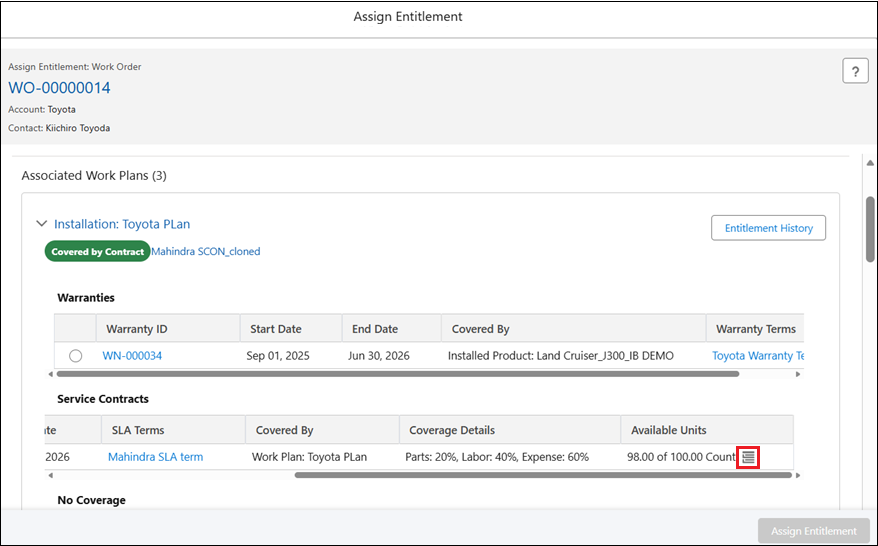
The Usage Summary pop-up window is displayed.
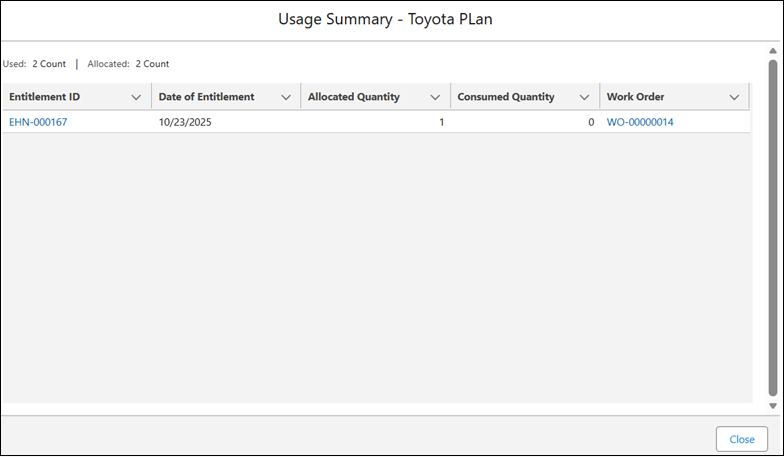
The Usage Summary pop-up window also includes a table showing where the units were used:
The header displays the total entitlement usage for the selected Work Plan:
◦ Used: The total Consumed Quantity across all usage records.
◦ Allocated: The total Allocated Quantity across all usage records.
The following table describes the information displayed in the Usage Summary.
|
Column
|
Description
|
|---|---|
|
Entitlement ID
|
Displays the Entitlement ID as a hyperlink. Clicking the link opens the service history (entitlement) record in a new browser tab.
|
|
Date of Entitlement
|
The date when the entitlement was applied. Dates are displayed in the user’s locale.
|
|
Allocated Units
|
The number of units allocated to this Work Plan, as defined on the Covered Work Plan.
|
|
Consumed Units
|
The number of units consumed for this Work Plan, as recorded in the Covered Work Plan.
|
|
Work Order / Installed Product
|
Displays the record where the Work Plan was applied: the Work Order number (if the Work Plan is assigned directly to the Work Order) or the Installed Product name (if the Work Plan is associated with a Service Product). Clicking the link opens the record in a new browser tab.
|
5. Select Close to return to the entitlement view.