Reviewing Entitlement History
You can review the entitlement history to understand how entitlement coverage has changed over time for a Service Product or Work Plan in a Work Order. This helps determine whether the coverage currently applied is still valid and whether any reassignment may have affected service delivery or billing.
Reviewing entitlement history is useful when:
• A customer raises concerns about service not being provided under coverage.
• A customer claims they were eligible for free service or discounted service.
• A customer was billed for service they believed was covered.
• The billing team identifies mismatches between applied coverage and invoicing.
• A customer disputes service usage or claims they did not receive benefits.
• Service coverage appears to have changed during the Work Order lifecycle.
In these situations, history helps identify whether coverage was assigned initially and later changed (for example, changed from Covered to Not Covered, or the reverse).
To view Entitlement history:
1. Open the Work Order and launch Assign Entitlement.
2. Locate the Service Product or Work Plan you want to review.
3. Select Entitlement History.
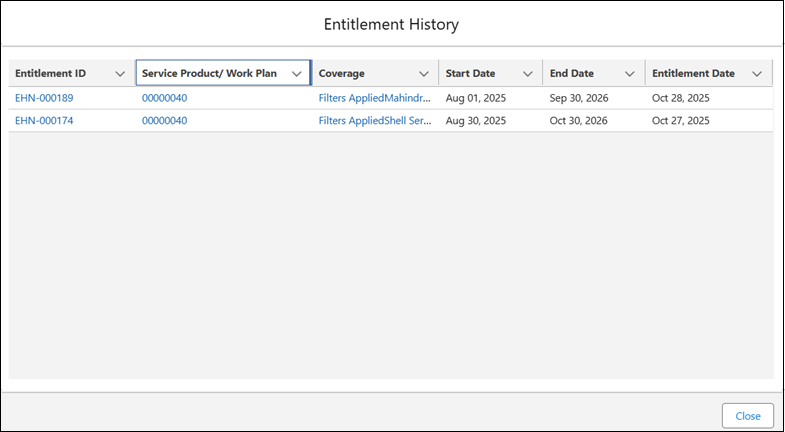
The Entitlement History pop-up window is displayed.
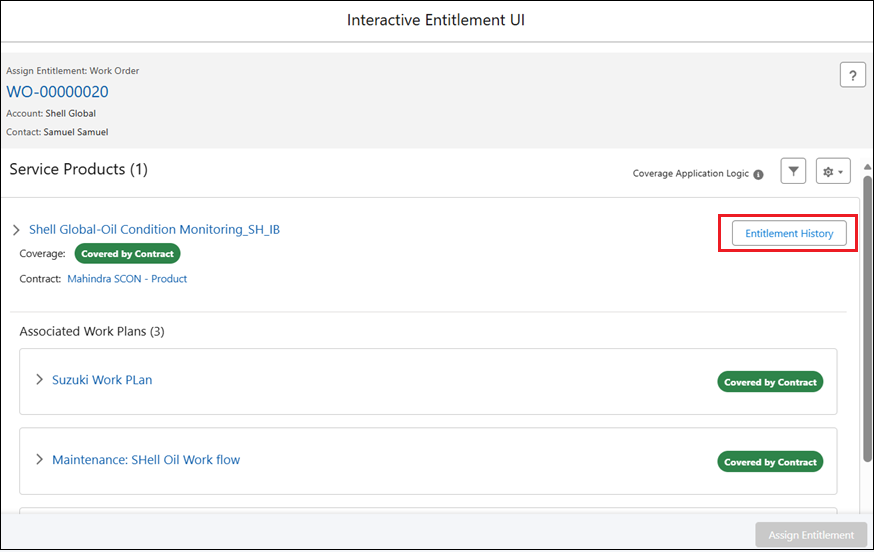
The Entitlement History button is displayed on each Service Product card for Service products added to the Work Order, and on each Work Plan card for Work Plans added directly to the Work Order.
4. Review the history table. The following details are displayed:
|
Column
|
Description
|
|---|---|
|
Entitlement ID
|
Displays Entitlement ID as a clickable link. Click to open the entitlement record in a new browser tab.
|
|
Service Product / Work Plan
|
Displays the Service Product name (for example, Installed Product name) or the Work Plan name as clickable link. Click to open the record in a new browser tab.
|
|
Coverage
|
Displays either:
Contract: Displays the service contract name as a clickable link. Click to open the record in a new browser tab.
Warranty: Displays the Warranty name as a clickable link. Click to open the record in a new browser tab.
|
|
Start Date
|
Displays the start date of the applicable service contract or product warranty.
|
|
End Date
|
Displays the end date of the applicable service contract or product warranty.
|
|
Entitlement Date
|
Displays the date coverage was applied or recorded in entitlement history.
|
5. Select Close to exit from the pop-up window.