Requesting Parts for a Work Order
Field engineers or technicians can identify and request the parts required to complete a Work Order. Using the Request Parts SFM, you can request parts from inventory, suppliers, or warehouses. These requests help track part availability, manage inventory, and ensure timely fulfillment. For more information, see Parts Request.
To request for Parts for a Work Order:
1. From the Home page, go to the Work Order object and open a Work Order record.
2. From the Service Flow Wizard, click Request Parts SFM.
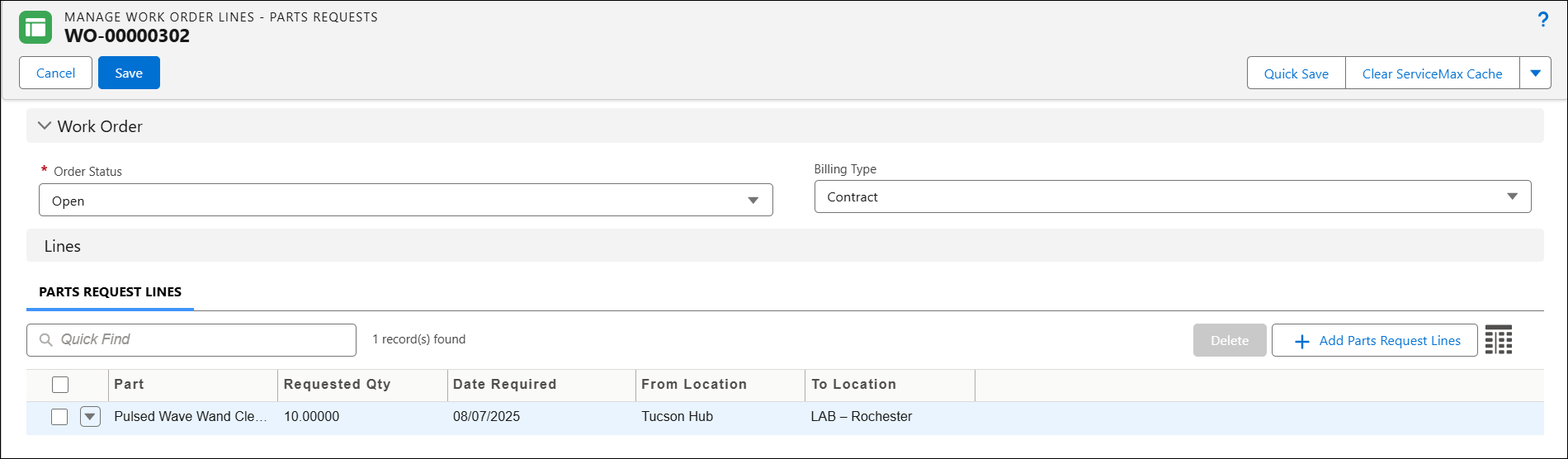
The Manage Work Order Lines-Parts Requests page is displayed.
3. In the Order Status, select the appropriate status of the Work Order.
4. In the Billing Type, select the applicable billing method. This specifies how the Work Order is charged to the customer. It determines whether the work order is billable, covered under warranty or contract, or intended for internal purposes.
5. Under Parts Request Lines, click Add Part Request Lines.
6. Add the required parts, specifying the Requested Quantity, Date Required, From Location, and To Location.
7. Click Save.
In the Related Tab of the Work Order record, the Work Detail Line of Record Type, Requests/Receipt is created under the Work Details section.