Recording Usage or Consumption for a Work Order
After completing a Work Order, you must record all resources consumed, such as parts used, labor hours, travel time, and other expenses. This information is used to calculate the actual labor and material costs, which may differ from the initial estimates. Accurate usage recording ensures correct customer billing, supports audit readiness, and maintains data consistency across systems. Using the Record T&M SFM, you can record usage or consumption lines.
To record usage or consumption for a work order:
1. From the Home page, open a Work Order record.
2. Click Record T&M SFM. The Manage Work Order Lines-Usage page is displayed.
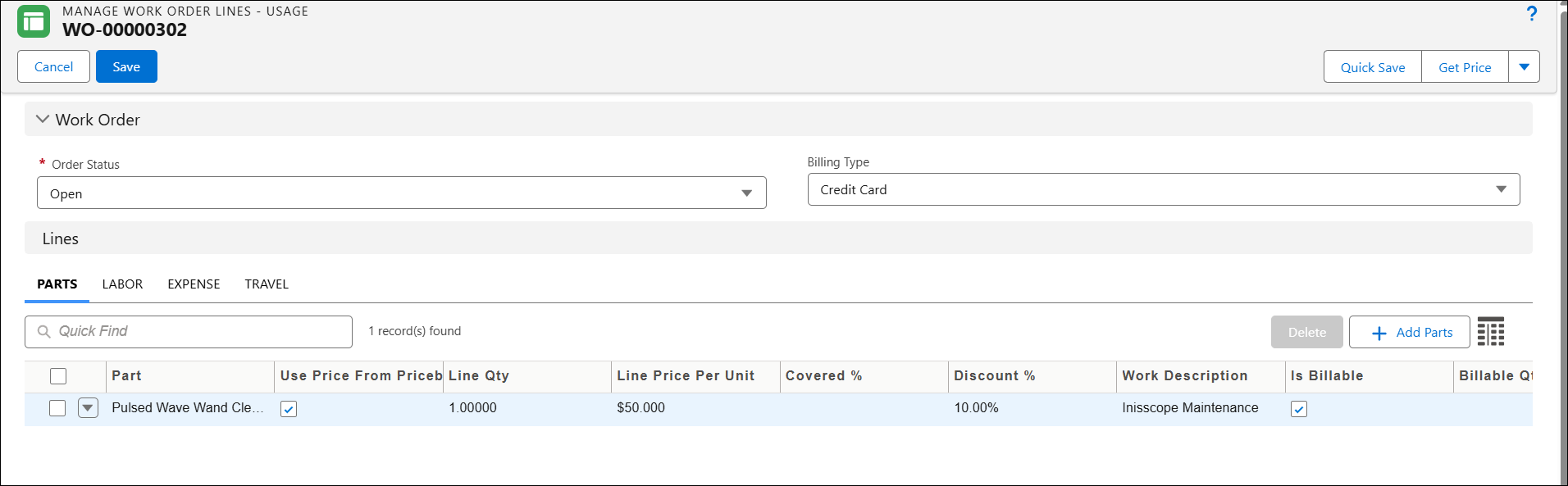
3. In the Order Status, select the appropriate status of the Work Order.
4. In the Billing Type, select the applicable billing method. This specifies how the Work Order is charged to the customer. It determines whether the work order is billable, covered under warranty or contract, or intended for internal purposes.
5. Under Lines, add the required Parts, Labor, Expenses, and Travel, specifying the Line quantity, Line Price per Unit, and other details.