Modifying the Purpose of Visit on a Schedule Output Line within the Milestone Schedule in 25.1
In the Milestone Schedule, you can change the Purpose of Visit (Work Plan or Task Template) for Schedule Output lines based on your requirements.
1. In the New Condition-Based PM Plan wizard, go to the Schedules tab. For more information, see Creating Condition-Based PM Plans.
The configured rules are auto-populated based on the PM Plan template and assigned to each coverage line for the Plan.
2. Expand a coverage line to view the associated condition rules and advanced expressions.
3. Click Milestone Schedule.
The Schedule Output pop-up window is displayed with the list of Schedule Output lines generated for a coverage line.
4. To change the Purpose of Visit, click the Edit icon next to a Schedule Output line.
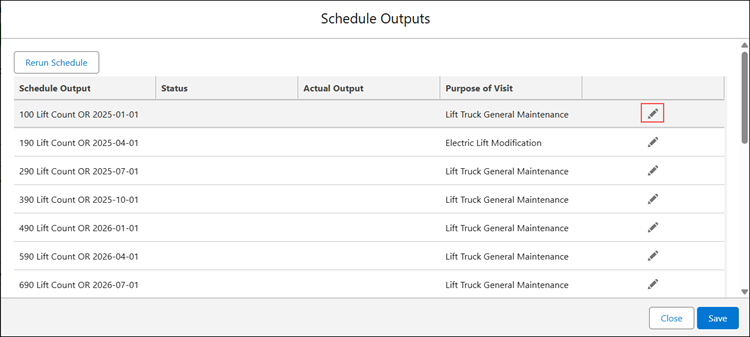
The Select Purpose of Visit pop-up window is displayed.
5. Search and select the required Work Plan or Task Template. If you Change the Purpose of Visit Type, all other Purpose of Visit selections from future Schedule Outputs will be removed.
6. Click Select.