Deleting a Warranty Term
You can delete a warranty term when it is no longer needed or is not associated with any active service contracts. Deleting a warranty term helps keep your warranty records current and prevents obsolete terms from being used in future entitlement decisions. Ensure that the warranty term is not linked to products, service contracts, or Covered Work Plans before deleting it.
To delete a warranty term:
1. Go to ServiceMax Setup > Warranties & Contracts > Warranty Terms.
The Warranty Terms page is displayed.
 |
You can also select the App Launcher, type Warranty Terms in the search bar, and select it from the results.
|
2. To view all warranty terms, click All Warranty Terms from the list view dropdown.
A list of Warranty Terms is displayed.
3. Locate the Warranty Term record you want to delete, then
click the More Actions menu located next to the relevant record, and select Delete.
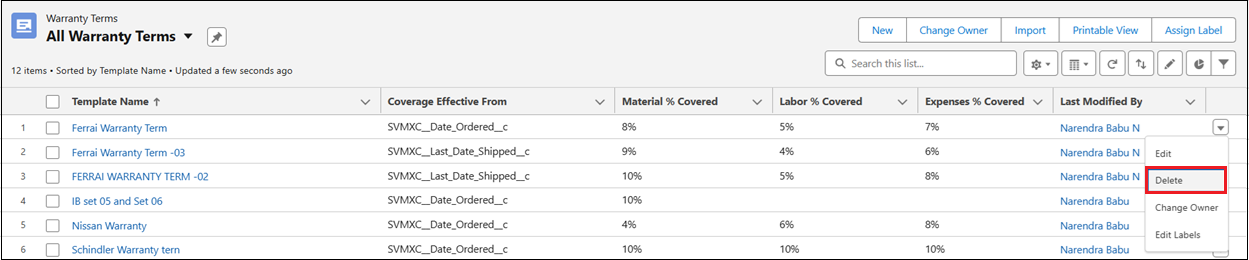
The Delete Warranty Terms pop-up window is displayed
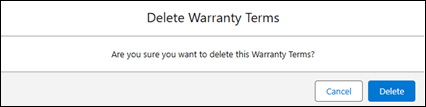
4. Click Delete to confirm the deletion or click Cancel to discard the action.
The selected warranty term is deleted.
5. After deletion, a confirmation message appears at the top of the screen with an Undo hyperlink. Click Undo if you want to restore the deleted observation.
|
|
|