Configuring the Lightning Web Component for Interactive Entitlement
To configure the Interactive Entitlement LWC:
1. Navigate to the Work Order.
2. Click Setup > Edit Page.
The Lightning App Builder page is displayed.
3. Select the page area, then click Add Tab and choose the new tab.
4. Click Add Tab on the right panel.
5. Set Tab Label to Custom, enter the tab name, and click Done.
The tab is added to the page.
6. In the Components section, search for Interactive Entitlement, and then drag and drop the component from the Custom Managed panel to the new custom tab.
7. Click Save and Activate.
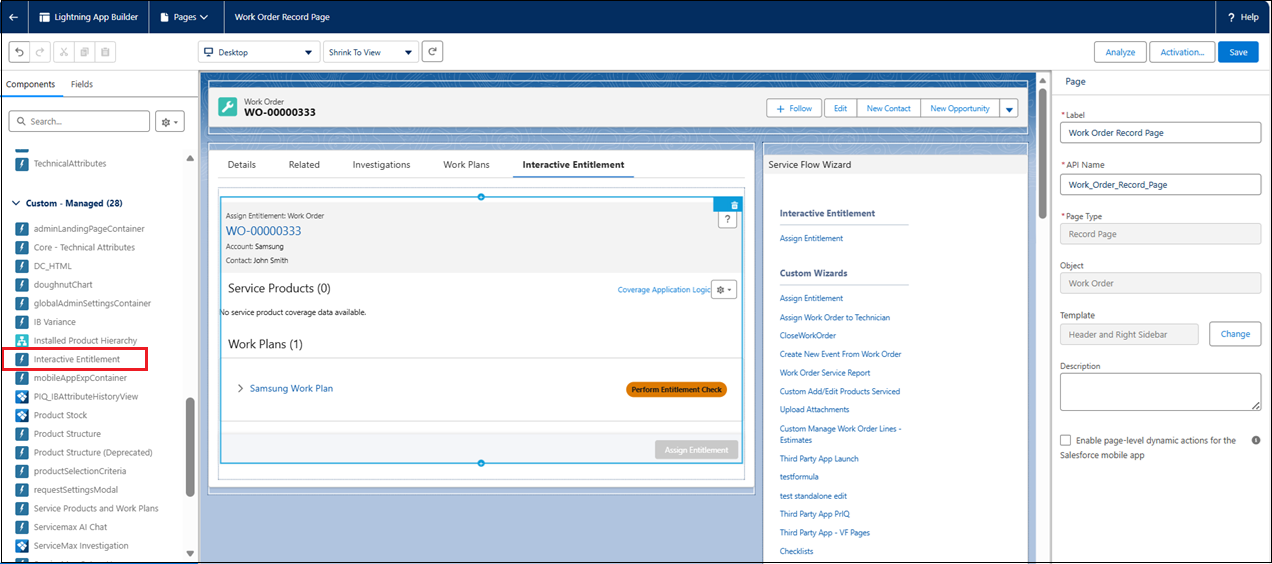
8. Exit Lightning App Builder and navigate back to the Work Order record.