Viewing the Task Status for the Work Order
You can view work order execution summary based on service task and service product statuses. This widget provides an overview of how many service products are yet to be serviced and how many service tasks are still open against the total assigned.
This view helps you to track the progress and plan ahead in case of slow progress.
 |
To view task status from the work order, the administrator must add the Work Order Execution Summary Widget to the Work Order record. For more information, see Adding the Work Order Execution Summary Widget to Work Order.
|
To view the status for the work order:
1. Launch the work order record for which you want to view the activity status and track the progress.
2. View the section where the Work Order Execution Summary packaged Lightning widget is added. The status of the service tasks in the work order is displayed by default.
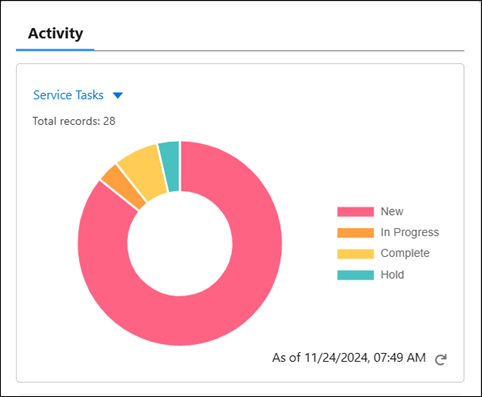
Total number of service tasks in the work order is displayed. The graph displays the breakdown of service tasks in various statuses.
◦ Hover over the graph segments to view the number of tasks for the status.
◦ The time stamp indicates when the data was last obtained. Click the Refresh icon next to the time stamp to obtain the latest service product and service task status information.
3. Select Service products in the dropdown menu in the activity section to view the status of service products.
The graph displays the status of service products in the work order.
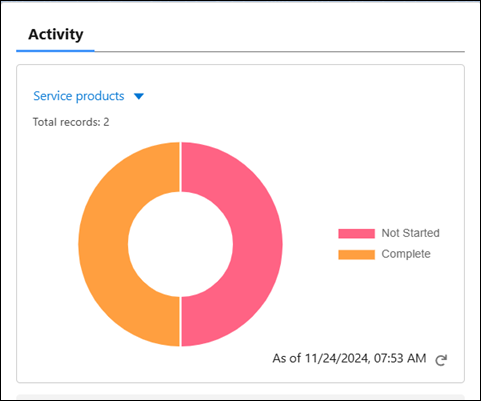
Total number of service products in the work order is displayed. The graph displays the breakdown of service products in various statuses.
◦ Hover over the graph segments to view the number of service products for the status.
◦ The time stamp indicates when the data was last obtained. Click the Refresh icon next to the time stamp to obtain the latest service product and service task status information.