Labor Lines Generation upon Work Plan Completion
After a Work Plan is marked as Complete, the system automatically generates labor lines for each completed service task. These labor lines capture specific information and the time spent by technicians.
To automatically generate labor lines upon Work Plan completion:
• Ensure that the admin has configured Labor Lines Creation by setting the Create Labor Line When Status Changes To option to Work Plan Completion. For more information, see Configuring Labor Line Creation.
• Enable the Create labor line on Work Order when status is changed to complete checkbox while creating or revising service tasks in a Work Plan Template or Work Order.
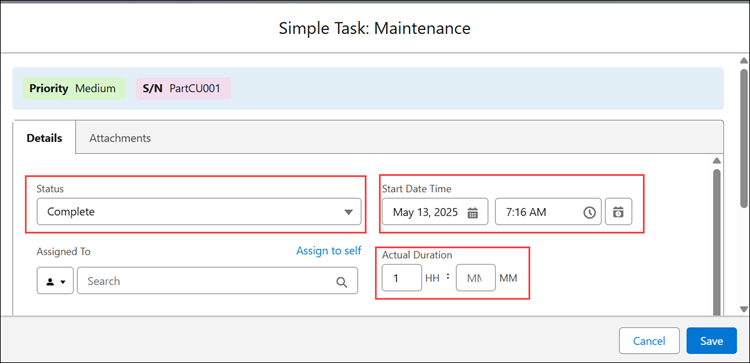
From a Work Order, when a service engineer sets the status of all service tasks associated with a Work Plan to Complete, and specifies either the Start Date or Actual Duration for each task, the Work Plan is automatically marked as Complete.
 |
You can manually mark the Work Plan as Complete to automatically generate labor lines only for the specific tasks that are completed. To mark the Work Plan as Complete, click the Settings icon and select the Mark Work Plan as Complete.
 |
Upon Work Plan completion, the Work Detail Lines of type Labor are automatically generated for each completed task marked for labor line creation.
|
|
It is mandatory to specify either the Start Date or Actual Duration when the Create labor line on Work Order when status is changed to complete option is selected.
|
In the Work Plan History object, a new record is logged indicating the success or failure of labor line creation status and relevant message. For the record, you can view the associated Work Order and Work Plan Assignment records.

Upon task completion, the Actual Duration is automatically populated based on the Estimated Duration specified in the task. The Start Time and End Time fields are also auto-populated.
Use Case
Tracking execution progress and labor across multiple technicians
Role: Service Manager
A service manager at Iniscope International assigns a Soniscape SSI 1000 maintenance work plan to a work order at Unity Hospital. The work plan includes eight service tasks distributed across two technicians over three days. As each techinican completes tasks, the system creates labor lines automatically, capturing time spent per task and per assignee. The service manager monitors execution progress from the work order summary view without contacting the technicians directly. This provides real-time visibility into multi-technician, multi-day service jobs and produces accurate labor data for invoicing and field service performance reporting.