Creating an Auto-Assignment Rule for Work Order in 25.1
You can create a rule for Work Orders, defining specific criteria and conditions for Work Plan assignment.
To create an auto-assignment rule for Work Orders:
1. From the Home page, go to ServiceMax Setup > Work Plan Management > Auto-Assigment Rules.
By default, The Auto Assignment Rules page is displayed with the list of active rules for Work Order.
2. Click Add Rule.
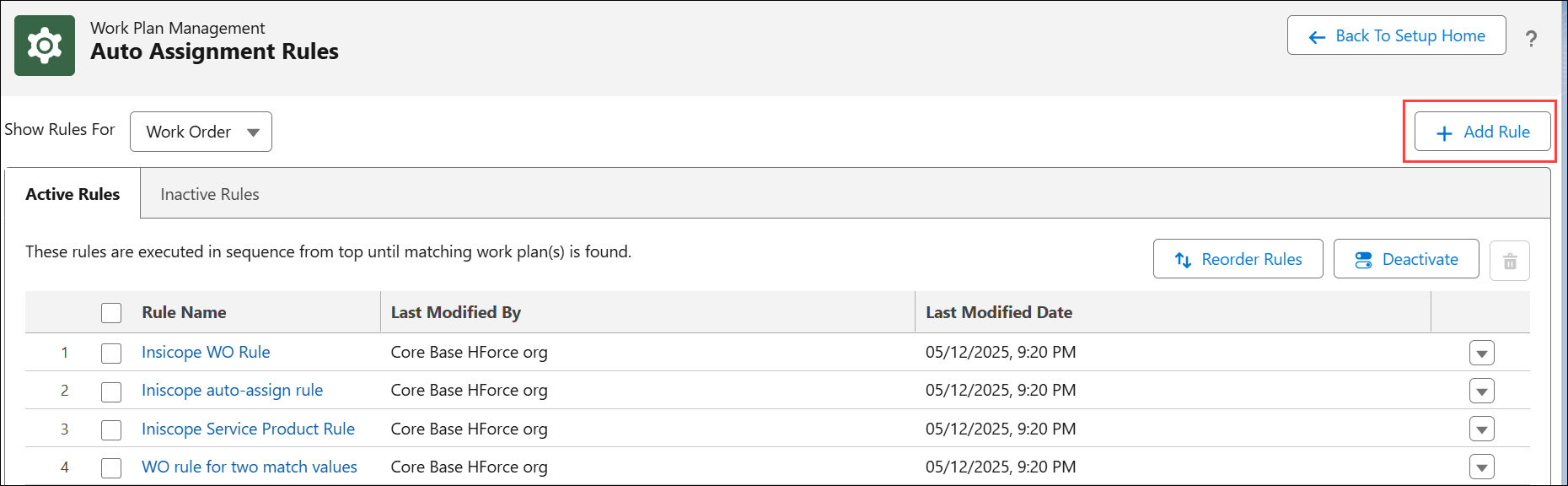
The Auto Assignment Rule page is displayed.

3. Configure the fields as described in the following table:
|
Field
|
Description
|
||
|---|---|---|---|
|
Rule Name
|
Enter a name for the rule.
|
||
|
Rule Active
|
Enable this toggle button to activate the rule. Only active rules are considered for execution.
|
||
|
Assign Work Plan To
|
From the drop-down, select Work Order.
This field specifies the object for which the work plan assignment rule is configured.
|
||
|
Developer Name
|
Indicates the unique ID of the rule.
|
||
|
Qualification Criteria
|
Select a criteria (SFM Expressions) from the drop-down to qualify Work Orders for assigning a Work Plan. The drop-down lists the SFM Expressions created for a Work Order. For more information, see SFM Expressions.
Based on the selection, the Work Plan is assigned only to qualified Work Orders. If blank, the work plan assignment rule is executed on all Work Orders with Perform Auto Assignment flag set to true.
|
||
|
Description
|
Enter a description for the rule.
|

4. Configure any of the following options to apply Work Plan to Work Orders:
5. Select Perform Entitlement Check when Work Plan is Assigned to perform entitlement on assigned Work Plans to view the coverage.
6. Click Save.