Using AI Actions in Service Board
To use Service Board AI Actions:
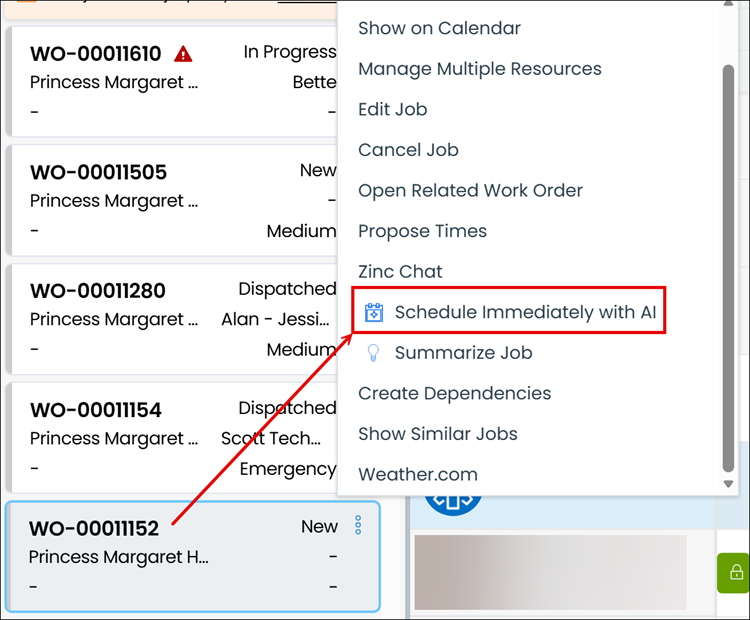
1. On the Scheduler Job List, select a Job Card, and then on the Job Action Menu, click an AI Action, for example, Schedule Immediately with AI.
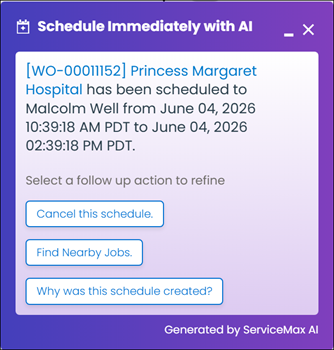
2. After the AI Action executes, in the Schedule Immediately with AI chat dialog box, review the response, and then click any of the follow-up questions to continue the conversation.
 |
• If the newly scheduled Appointment is not visible on the Calendar, click the hyperlinked Appointment name to view it.
• You cannot run multiple AI Actions at the same time. If you are still running a previous AI Action, or the related Schedule Immediately with AI chat dialog box is still open, all AI Actions on the Job Action Menu are hidden.
|
Use Cases
This feature supports common real‑world scenarios. For more information, see Use Cases for AI Actions to understand when and why to use it.
Related Topic