Renaming Chat Title
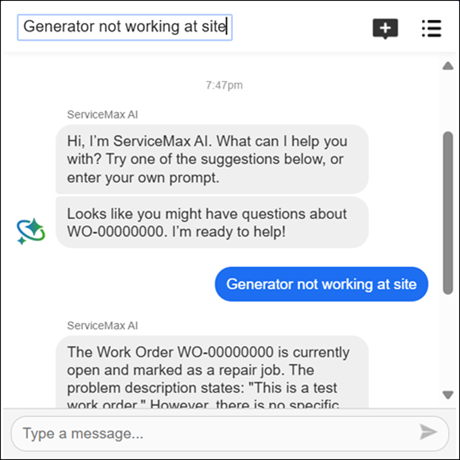
You can manually update the default title assigned to a chat conversation. By default, chat titles are generated from the initial user input. These titles may be lengthy or ambiguous, which can make it difficult to identify the conversation later. This feature enables users to assign a concise, context-specific title to improve session traceability. For example, a field technician might initiate a chat with the title: Generator not working at site, and this can be renamed to: WO-4589 – Generator Fault – Site 12. This updated title provides a clear reference to the work order, issue type, and location, making it easier to retrieve and review the conversation in future.
To rename a chat title, perform the following steps.
1. Open the ServiceMax AI Assistant. For more information about using AI Assistant, see ServiceMax AI Assistant in ServiceMax Web.
2. Click the Hamburger icon on the ServiceMax AI Assistant screen.
A list of previous conversations appears, each with a date and time stamp.
3. Select the conversation title you want to edit.
The full conversation is displayed.
4. Click the title name, enter the new title, and press Enter to save the changes.
The new title is displayed in the conversation list and recorded as part of the session history.