Scores
Create and manage scoring models for assets based on weighted factors and criteria to assess risk, health, and opportunity.
Overview
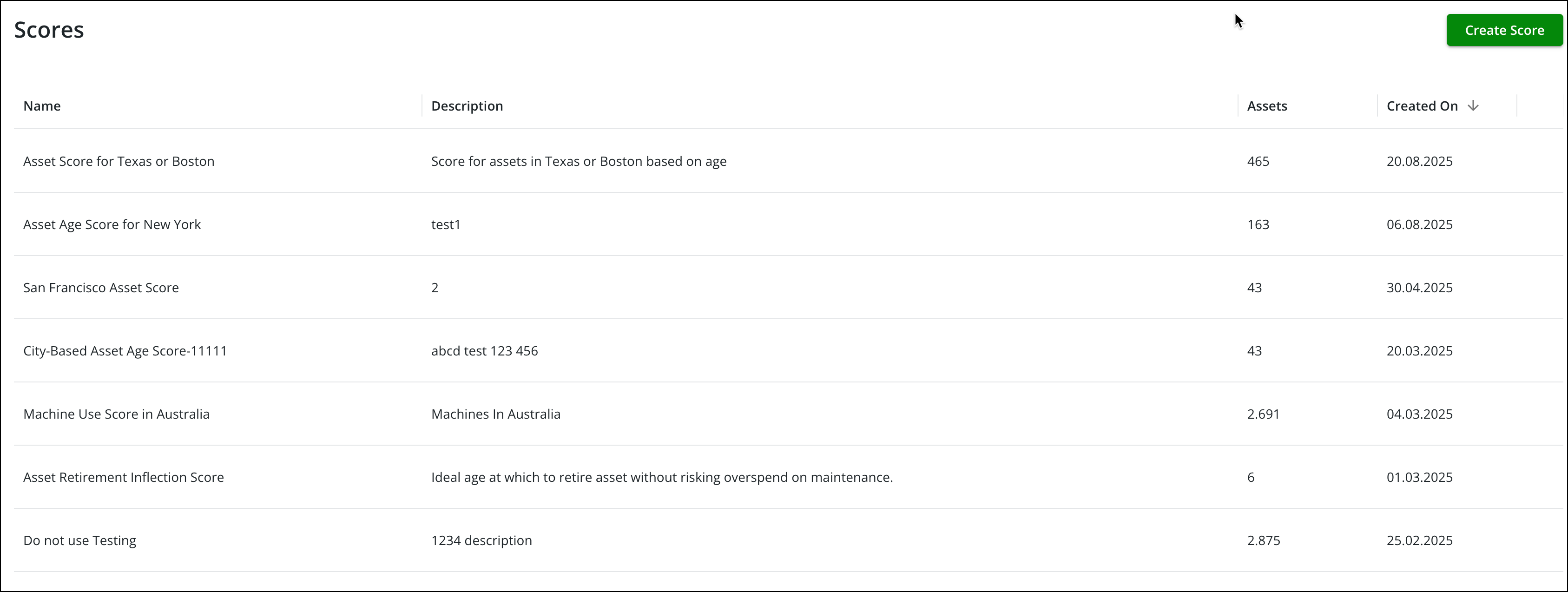
The Scores page in PTC Orbit provides you with the ability to create, manage, and customize scoring systems for assets based on weighted factors and criteria. This page displays a list of existing scores, including details such as the score name, description, the number of associated assets, and the date the score was created. You can use the Create Score option to define new scoring models by applying specific factors and weightings. The interface is designed for ease of management, allowing you to edit or remove existing scores directly from the list using an action menu. This page helps organizations assess asset performance, prioritize critical assets, and drive data-informed decisions by enabling tailored scoring configurations.
How it works
• Create a New Score: Click the Create Score button to define a new scoring model using weighted values and factors.
• Edit an Existing Score: Select the Edit option from the action menu next to an existing score to modify its configuration.
• Remove a Score: Choose the Delete option from the action menu to delete a score from the list.
• Disable a Score: Choose the Disable option from the action menu to disable a score that is no longer relevant. Disabling a score removes it from the asset details view without permanently deleting them. Disabled scores are no longer calculated during scheduled batch jobs.
• Enable a Disabled Score: Choose the Enable option from the action menu of a disabled score to re-enable it.
• View Score Details: Review information about each score, including its name, description, the number of assets associated with it, and the creation date.
• Sort Scores: Sort the list of scores by creation date or other visible fields for easier navigation.
This page streamlines score configuration management, allowing users to create flexible scoring systems that align with organizational goals and asset monitoring requirements.
Related Topics
• Assets