Style: Copy Paste
Creo Parametric 13.4.0.0
User Interface Location: Click >  Copy and >
  Paste.
Copy and > Paste.Videos
Description
In Style, you can now copy and paste Style subfeatures within the given Style feature.
• Copy
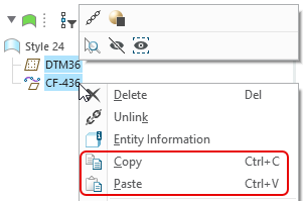
Copy◦ You can select and copy one or many Style subfeatures; including curves, surfaces, and internal planes.
◦ The copy operation can be performed from the Style tab, Style Tree, or through the keyboard shortcut CTRL+C.
Style tab: | Style tree: |
 |  |
• Paste
Paste◦ Once a copy is performed, you will be able to paste the copied Style subfeatures in the current Style feature.
◦ The paste operation can be performed from the Style tab, Style Tree, or through the keyboard shortcut CTRL+P. Paste will be available only within the same Style feature from which the copy was done.
◦ The Advanced Reference Configuration dialog will appear, allowing you to select alternative references for the copied subfeatures.

◦ The new entities created through the paste operation will not be dependent on the original copied subfeatures and will be named generically, without a copy suffix.
◦ The pasted entities will retain the constraint definition that was defined in the original copied entity.
Benefits
This enhancement streamlines the creation of similar Style subfeatures, making the design process more intuitive and efficient, and saving you time and effort.
Additional Information
Tips: | None. |
Limitations: | No known limitations. |
Does this replace existing functionality? | No. |
Configuration option associated with this functionality: | None. |