Style and Restyle: Control Mesh Enhanced Usability and Performance
Creo Parametric 13.4.0.0
User Interface Location:
• Style: Click  Style >
  Surface Edit.
Style > Surface Edit.• Restyle: Click >  Modify Shape.
Modify Shape.Description
Recent improvements to Style and Restyle significantly enhance the control mesh experience across the display, performance, and selection workflows.
• Improved Visualization
The control mesh display has been refined to provide clearer visibility of both control points and the underlying mesh structure, making it easier to interpret and manipulate complex surfaces.
• Performance Boost with Dense Meshes
When you work with dense control meshes you will experience smoother interactions—such as spinning, panning, and zooming—especially when editing surfaces or reshaping geometry. Pre-highlighting and selection responsiveness have also been optimized for better usability.
• Advanced Selection Handling
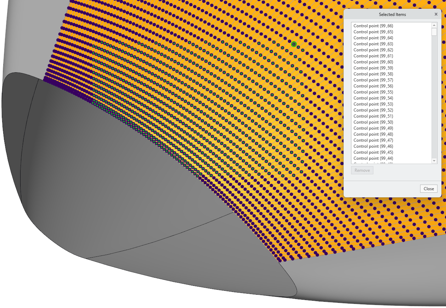
All selected control points are now included in the standard selection buffer. This allows you to view the complete list of selected points, highlight individual ones, or remove specific points as needed, offering greater control and flexibility during editing.
Benefits
Improved usability and productivity when editing a surface in Style, or modifying a shape in Restyle, making it easier to capture your design intent.
Additional Information
Tips: | None. |
Limitations: | No known limitations. |
Does this replace existing functionality? | No. |
Configuration option associated with this functionality: | None. |