Style: Curve on Surface (COS) Curves - Control Point Mode Enhanced
Creo Parametric 13.4.0.0
User Interface Location: Click  Style >
  Curve >
  Curve on Surface >
  Control Points.
Style > Curve > Curve on Surface > Control Points.Videos
Description
Style has been enhanced to allow the control points for a Curve on Surface (COS) to be dragged beyond the boundary of the reference surface.
• In previous versions, you could only move the control points within the boundary of the reference surface, which limited the resulting shape of the curve.
Previous version:
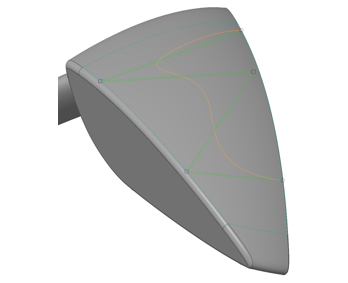
• Enabling the control points to be moved beyond the reference surface boundary will provide you with greater flexibility in defining the curve shape.
While the resulting curve will remain limited to the reference surface, this enhancement will allow the curve to approach or be on the edge of the surface if desired.
Update:

Benefits
• Improved modification of control points, allowing you to achieve the desired shape of the Curve on Surface curve
• Improved usability and productivity
Additional Information
Tips: | None. |
Limitations: | No known limitations. |
Does this replace existing functionality? | No. |
Configuration option associated with this functionality: | None. |