Multibody Support Enhancements in Creo NC
Creo Parametric 12.4.0.0
User Interface Location: N/A
Videos
Description
The following enhancements are now available to support multibody in Creo NC:
• You can now assemble a multibody part using  Assemble Reference Model. Previously, it was not possible to assemble a part containing multiple bodies using Assemble Reference Model..
Assemble Reference Model. Previously, it was not possible to assemble a part containing multiple bodies using Assemble Reference Model..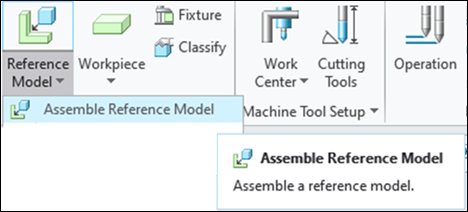
Also, you can now create Manufacturing features such as Workcell, Operation, and MFG sequence on a multibody part.
• The mill window enhancements include:
◦ The Silhouette reference model collector now enables you to select a reference part (default) or multiple bodies belonging to a single reference part.
◦ You can use the new Excluded bodies collector to exclude bodies if you have selected a multibody part in the Silhouette reference model collector.
◦ For the  Chain type, you can select a chain across bodies, which do not have gaps between them.
Chain type, you can select a chain across bodies, which do not have gaps between them.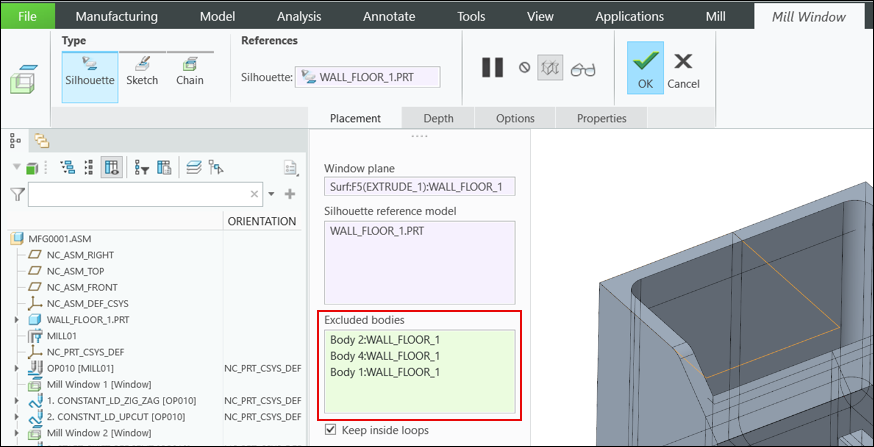
• Enhancements to creating the milling toolpath on a multibody part include:
◦ For machining sequences that use a mill window as a machining reference, all bodies under the mill window are considered for toolpath creation and degouging.
◦ For machining reference sequences based on the surface selection, you can select surfaces from a body, and a toolpath is generated on these surfaces.
◦ In the Check surfaces collector, when you select a part, all bodies across the part are selected for degouging. You can also select individual surfaces across bodies as Check surfaces.

• The turn profile enhancements include:
◦ The Reference model collector now enables you to select a reference part (default) or multiple bodies belonging to a single reference part.
◦ You can use the new Excluded bodies collector to exclude bodies if you have selected a multibody part in the Reference model collector.
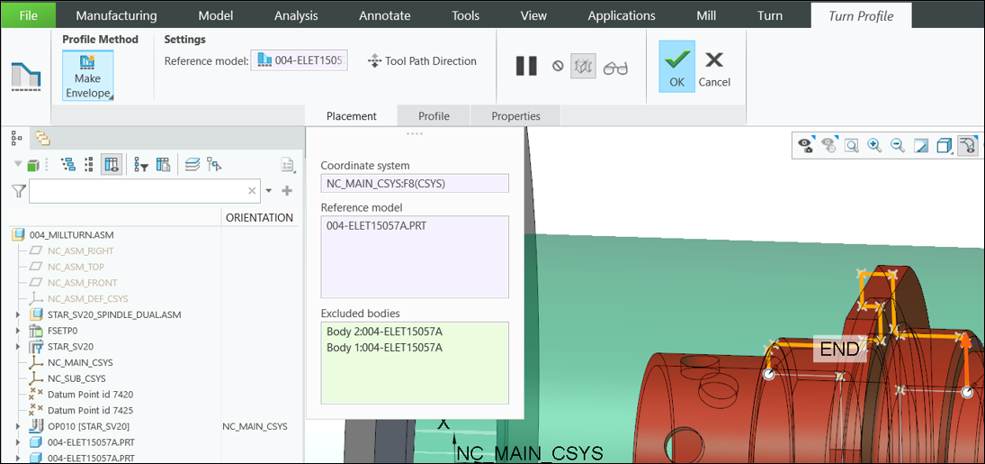
• Enhancements to selecting bodies along with the part include:
◦ Selection of a multibody part or a body as a machining reference is now supported for HSM sequences, such as Rotary Rough, Rotary Finish, Auto Deburring, and Undercut Machining.
◦ The smart filter now provides Body as another option along with Part.
◦ When you select a body, the machinable area of only that body is considered for the toolpath creation and degouging.

Benefits
This enhancement provides the following benefits:
• Supports multibody parts in Creo NC
• Supports part and body selection as a machining reference
• Supports exclusion of bodies
• Consistent with Creo NC workflows
Additional Information
Tips: | None. |
Limitations: | For more information on limitations, see the “Using Multibody Parts in NC Assemblies” topic under Related Topics. |
Does this replace existing functionality? | No. |
Configuration option associated with this functionality: | None. |