Basic 3D PDF Export
Creo Parametric 13.4.0.0
User Interface Location: Click > > > .
Videos
Description
Creo Parametric 13.4.0.0 now includes an enhancement to the 3D PDF export capabilities. With this release you have an additional export option, 3D PDF (pdf).
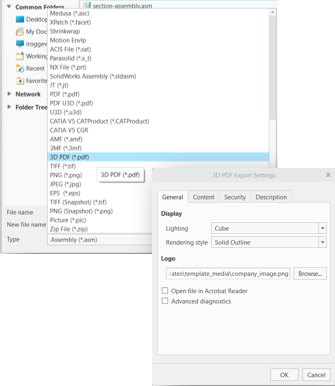
The exported 3D PDF includes your model, combination states, part and assembly-level PMI. On export, the system automatically associates your model with the part or assembly 3D PDF template. These templates include:
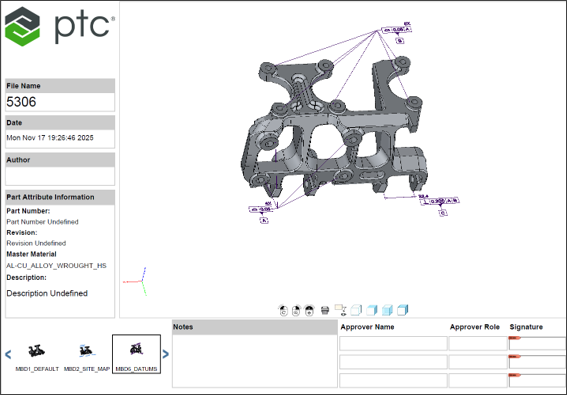
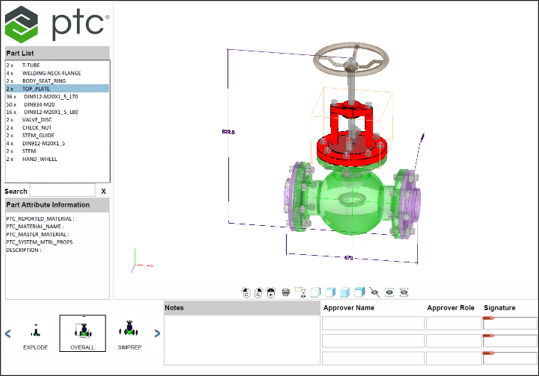
• A 3D view window where you can rotate, pan, zoom, and explore your model through the PDF document. This includes PMI associated with that combination state. You can also select from several Render Styles: Illustrated, Solid, Transparent, and Solid Outline.
• A view part list with cross-highlighting in the 3D view window.
• View thumbnails to quickly cycle through and select the combination state that the 3D PDF consumer would like to interrogate.
• Model information like author name, file name, and date.
• Dynamic edit of the approver or reviewer name and signature areas. These can be edited and saved by the consumer of the 3D PDF dynamic area. Notes can also be edited and saved by a downstream consumer of the 3D PDF.
• Customization option to include your company logo.
Exporting a Part to 3D PDF
Exporting an Assembly to 3D PDF
Benefits
This enhancement enables you to share 3D information with downstream customers who may have only a PDF viewer to see MBD data.
Additional Information
Tips: | None. |
Limitations: | There are some functionality areas of Creo that are not currently supported by 3D PDF. For details, see the article on List of known limitations with 3D PDF Export in Creo Parametric |
Does this replace existing functionality? | No. |
Configuration option associated with this functionality: | None. |