Reference Laminate Feature
Creo Parametric 12.4.0.0
User Interface Location: In the Composite environment, click  Layup >
  Reference Laminate.
Layup > Reference Laminate.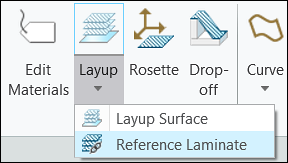
Videos
Description
You can now create an associative laminate by referencing layup settings and laminate objects from an existing composite design. This enables you to meet your manufacturing needs without modifying the source composite design.
When you create a reference laminate feature, only the laminate objects and their properties are copied to the new Composite environment. The design properties of the copied laminate objects and their sequence order remains protected. You can remove copied laminate objects or create new laminate objects.
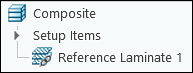
You can apply manufacturing operations, such as extending and splicing, to the copied laminate objects without modifying the existing composite design. Additionally, you can use all standard composite tools and operations, such as a core sample, draping simulation, solidification, and creation of a ply book, with the copied laminate objects.
Benefits
This enhancement enables the creation of a manufacturing reference model of a composite model and improves productivity.
Additional Information
Tips: | None. |
Limitations: | No known limitations. |
Does this replace existing functionality? | No. |
Configuration option associated with this functionality: | None. |