Merging Plies from Zones
Creo Parametric 12.4.0.0
User Interface Location: In the Composite Design environment, click  Plies From Zones.
Plies From Zones.Videos
Description
When you create multiple zone-based plies using the Plies From Zones tool, you can now merge similar plies between different zones.
You can perform the merging between zones by either matching stack rows or ignoring stack rows as follows:
• To merge similar plies that are defined at the same stack row in different sets, use the Match stack row option. The order of stack rows defines the resulting order in which the merged plies are created.
• To merge similar plies that are defined in different sets without considering the stack row, use the Ignore stack row option. You can arrange the merged plies according to their area by placing the largest ply either at the bottom or at the top. The next figure shows the options to arrange the resulting merged plies after you select the Ignore stack row option.
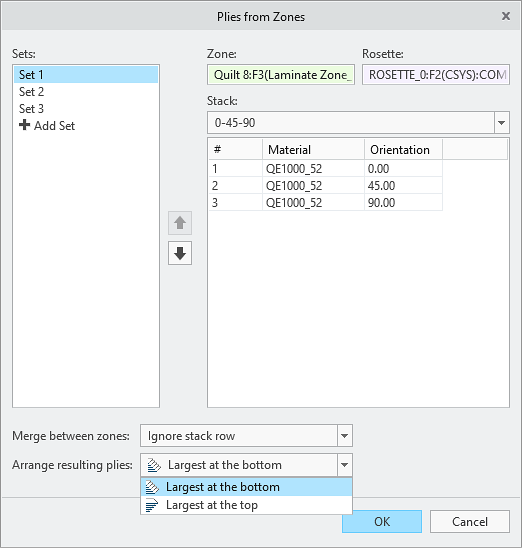
After creating the zone-based plies using the Plies From Zones tool, you can rearrange the order of the merged plies by reordering their corresponding zone based ply features.
Benefits
This enhancement improves productivity and provides more functionality for conceptual top-down Composite Design by enabling merging of plies between zones and creating zone-based plies and cores.
Additional Information
Tips: | None. |
Limitations: | No known limitations. |
Does this replace existing functionality? | No. |
Configuration option associated with this functionality: | None. |