Handling Missing Material Assignments
Creo Parametric 13.4.0.0
User Interface Location:
In the Composite environment:
• Click  Laminate Manager on the Laminate Tree. The label UNASSIGNED appears in the Material column when the material of the laminate object is missing or removed.
Laminate Manager on the Laminate Tree. The label UNASSIGNED appears in the Material column when the material of the laminate object is missing or removed.• Use the  Tree Columns action on the Composite Tree to display the Feature Status column. The label Unresolved appears in the Feature Status column when the laminate object created with the feature has a missing or removed material.
Tree Columns action on the Composite Tree to display the Feature Status column. The label Unresolved appears in the Feature Status column when the laminate object created with the feature has a missing or removed material.When creating a ply book for a composite feature that contains plies with missing materials, you have the following visual indicators:
• Drawing views with issues are indicated with  in the Drawing Tree.
in the Drawing Tree.• When you redefine the failing ply view or flat ply view, the affected ply is indicated with  next to the Active Ply box in the Drawing View dialog box. When you move the mouse pointer over , the tooltip indicates that the selected ply has no assigned material.
next to the Active Ply box in the Drawing View dialog box. When you move the mouse pointer over , the tooltip indicates that the selected ply has no assigned material.• Ply views and flat ply views do not display the plies and cores where the original assigned materials are removed or no longer available.
Description
In the Composite environment, you now have a standardized approach for managing plies and cores with unavailable or removed materials.
• The laminate objects with unavailable or removed materials are labelled UNASSIGNED.
• The associated features of the laminate objects are labelled Unresolved.
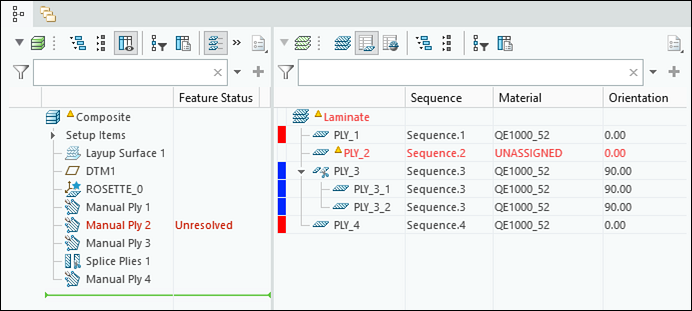
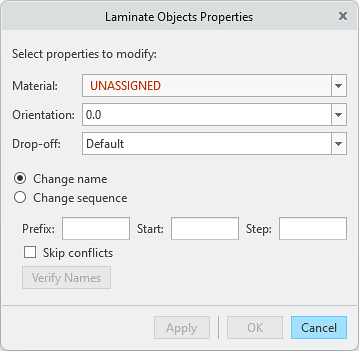
To assign a new material, you can use the Laminate Manager, redefine the feature that created the laminate object, or use the Laminate Objects Properties dialog box.
In a ply book, ply views and flat ply views do not display the plies and cores where the original assigned materials are removed or no longer available.

The views with issues are indicated with in the Drawing Tree.
in the Drawing Tree.Additionally, when you redefine a failing ply view or flat ply view, the ply or core with the issue is indicated with next to the Active Ply box in the Drawing View dialog box
next to the Active Ply box in the Drawing View dialog box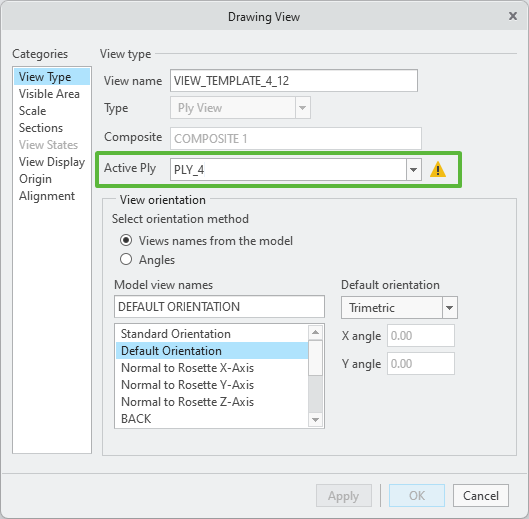
Benefits
This enhancement improves productivity by:
• Providing standardized labelling for plies and cores with missing materials.
• Eliminating the need for manual tracking or troubleshooting of missing material assignments, enabling better support and visibility.
• Providing better support and clearer visibility of ply views and flat ply views when plies or cores have missing materials.
Additional Information
Tips: | None. |
Limitations: | No known limitations. |
Does this replace existing functionality? | No. |
Configuration option associated with this functionality: | None. |