Flat Pattern Export Enhancements
Creo Parametric 13.4.0.0
User Interface Location: In the Composite environment, click >  Export Flat Pattern.
Export Flat Pattern.Description
The following enhancements improve the flat pattern export procedure:
• You can now adjust the text height of annotations directly in the Export Setup dialog box. This enables you to resize labels, such as ply names, to fit neatly within smaller ply shapes.
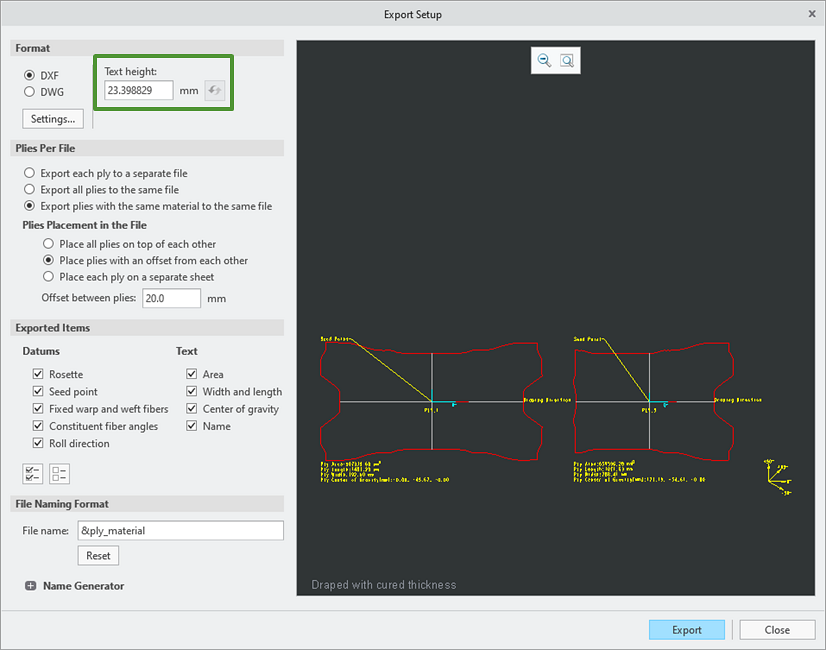
• You can now export the plies that use the same material to a single file. This reduces the number of output files per design and simplifies integration with nesting and cutting tools.

• You can now easily set default values for the Export Setup dialog box.
1. In the Creo Parametric Options dialog box, click > .
2. Under Plies Export from Composite Feature, specify the desired default values for the Export Setup dialog box.

3. Click OK to save the changes and close the Creo Parametric Options dialog box.
Benefits
These enhancements improve productivity by helping you do the following:
• Control label size more precisely
• Reduce the number of output files per design by exporting plies with the same material into a single file
• Access default export settings more easily and intuitively
Additional Information
Tips: | None. |
Limitations: | No known limitations. |
Does this replace existing functionality? | No. |
Configuration option associated with this functionality: | New configuration option: • export_plies_to_dxf_dwg_files separate*, separate_per_material, same. |