Flat Pattern Export Enhancement
Creo Parametric 12.4.0.0
User Interface Location: In the Composite environment click >  Export Flat Pattern.
Export Flat Pattern.Description
When you export the flat patterns of the laminate objects, the Export Setup dialog box is now enhanced with more options to provide a better control over the exported items.
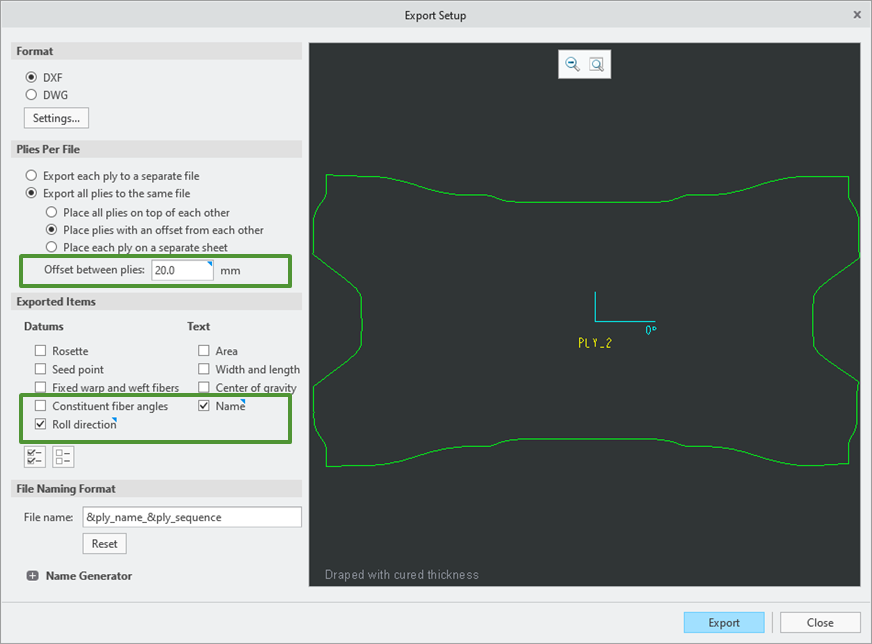
• When you export multiple laminate objects to the same file, you can now specify the distance between the laminate objects.
• The new markers Name and Roll direction now allow you to include the name and the roll direction of a laminate object in the flat pattern. The name of the laminate object is displayed just below the seed point in the flat pattern.
In the exported file:
• The selected type of the ply thickness (cured or uncured) for draping a laminate object is provided in the DXF information field.
• Additional DXF layers are created in the exported file to separately control the visibility of the geometry and text of the exported laminate object.
Benefits
These enhancements provide a better control over the exported information and improve productivity.
Additional Information
Tips: | None. |
Limitations: | No known limitations. |
Does this replace existing functionality? | No. |
Configuration option associated with this functionality: | New configuration options: • export_ply_name_text_to_dxf_dwg yes*/no • export_ply_roll_dir_to_dxf_dwg yes*/no |