Control the Creo Elements/Direct Density Transfer Method
Creo+
User Interface Location: Click > > .
Videos
Description
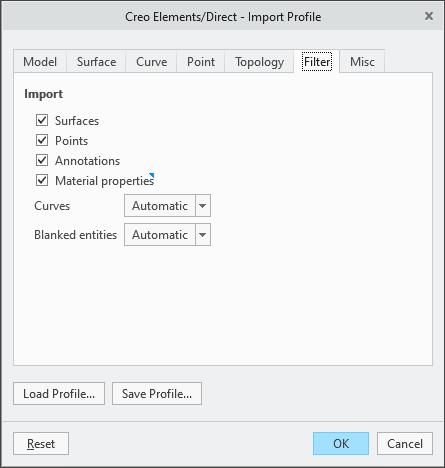
A new option Material properties has been introduced in the Filter tab of the Creo Elements/Direct-Import Profile dialog box. When Material properties is selected, there is no change to the existing functionality-density is transferred from Creo Elements/Direct by creating a dedicated material for each imported part, and this material is designated as the master material for the part. When Material properties is cleared, density is imported and updated using parameters.
Benefits
• Improved interoperability between Creo+ and Creo Elements/Direct.
• Additional control for how density is assigned on import and update.
Additional Information
Tips: | None. |
Limitations: | No known limitations. |
Does this replace existing functionality? | Previously, when importing or updating a Creo Elements/Direct model, Creo+ automatically created a new material for each part with the Creo Elements/Direct density and designated it as the master material. Now, you can control this behavior using the Material properties option. |
Configuration option associated with this functionality: | None. |