Transition Plies: Use Excel for Custom Transitions
Creo+
User Interface Location: In the Composite environment, do the following:
1. Click  Transition Plies. The Transition Plies tab opens.
Transition Plies. The Transition Plies tab opens.2. Select  Custom under Transition Type.
Custom under Transition Type.Videos
Description
When applying a custom transition to the laminate objects, you can now use Excel to edit transition offsets.
In the Custom transition, click  Edit in Excel to open the transition table in a temporary Excel window. You can then use Excel capabilities, such as formulas and functions, to edit the transition offset values of the laminate objects.
Edit in Excel to open the transition table in a temporary Excel window. You can then use Excel capabilities, such as formulas and functions, to edit the transition offset values of the laminate objects.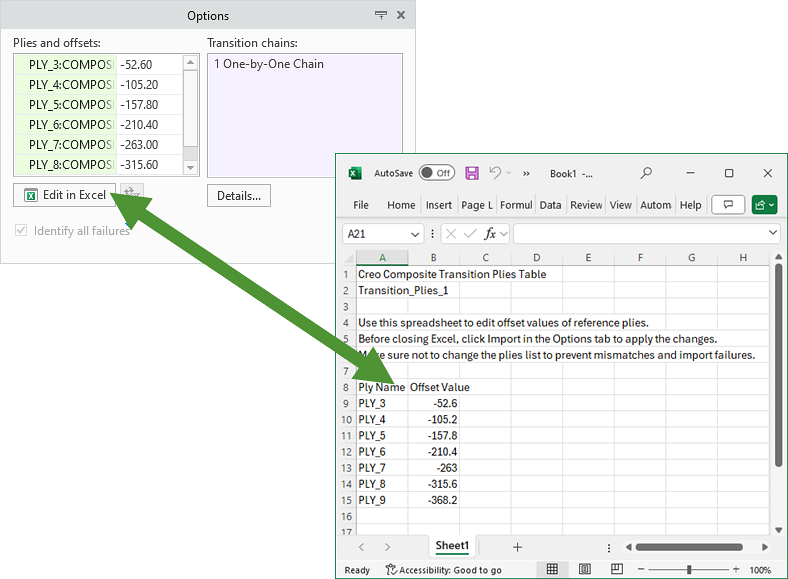
When you finish editing, you can simply click  next to Edit in Excel to import the changes from Excel to the transition table.
next to Edit in Excel to import the changes from Excel to the transition table.In Custom mode, the drag handles and the dimensions may obstruct the view of the transition effect. To hide both the drag handles and the dimensions, you can turn off the  Display Dimensions toggle.
Display Dimensions toggle.Benefits
This enhancement provides an easy and quick way to update the transition offsets of many laminate objects, improving productivity.
Additional Information
Tips: | None. |
Limitations: | No known limitations. |
Does this replace existing functionality? | No. |
Configuration option associated with this functionality: | None. |