Transition Plies: Check All Failures
Creo+
User Interface Location: In the Composite environment, click  Transition Plies.
Transition Plies.Videos
Description
When the transition cannot be processed for all selected laminate objects, it stops at the first failure, making it hard to investigate the remaining objects that fail.
Now, after the first failed transition, you can select the Identify all failures checkbox to identify all failing laminate objects. The failed transitions are also indicated by  in the collector.
in the collector.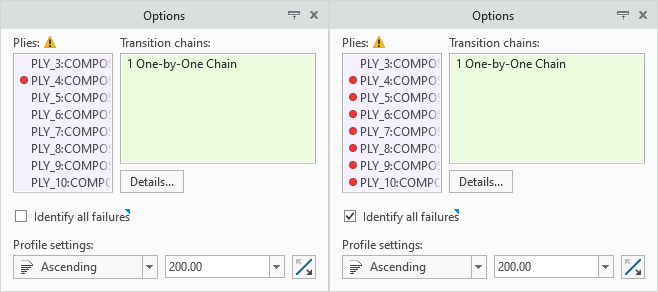
Identifying failures is very useful for large and complex transitions. After identifying the failures, you can switch to Custom mode and remove the failing laminate objects, keeping the offsets of remaining successful laminate objects unchanged.
Benefits
Now it is much easier to identify all laminate objects with the failed transitions.
Additional Information
Tips: | None. |
Limitations: | No known limitations. |
Does this replace existing functionality? | No. |
Configuration option associated with this functionality: | None. |