Additional Notification Types for Composite Features
Creo+
User Interface Location: Click > . In the Creo+ Options dialog box, click Notification Center.
Description
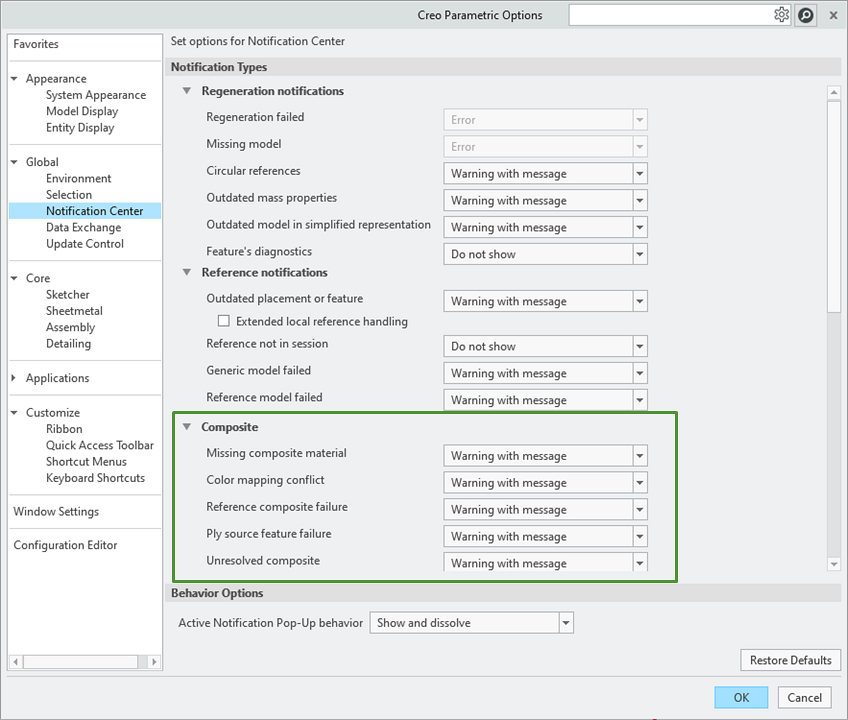
New notification types have been added to the Notification Center for the composite features. You can set the default value for each notification type using its configuration options.
The notifications for the following notification types are displayed in a Composite environment:
• Missing composite material (nmgr_ply_missing_material)
• Color mapping conflict (nmgr_composite_colors_conflict)
• Ply source feature failure (nmgr_failed_ply_source_feature)
The notifications for the following notification type are displayed in the part of the composite feature when the composite feature contains unresolved issues:
• Unresolved composite (nmgr_composite_unresolved)
Benefits
This enhancement improves user experience and productivity by alerting you to potential issues with model integrity, providing better insights.
Additional Information
Tips: | None. |
Limitations: | No known limitations. |
Does this replace existing functionality? | No. |
Configuration option associated with this functionality: | New configuration options: • Missing composite material (nmgr_ply_missing_material) • Color mapping conflict (nmgr_composite_colors_conflict) • Ply source feature failure (nmgr_failed_ply_source_feature) • Unresolved composite (nmgr_composite_unresolved) |