Grouping Support in the Laminate Tree
Creo+
User Interface Location: In the Composite environment, click Operations.
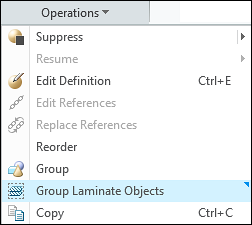
Description
Now, when features are grouped in the Composite Tree, related laminate objects are also grouped in the Laminate Tree.
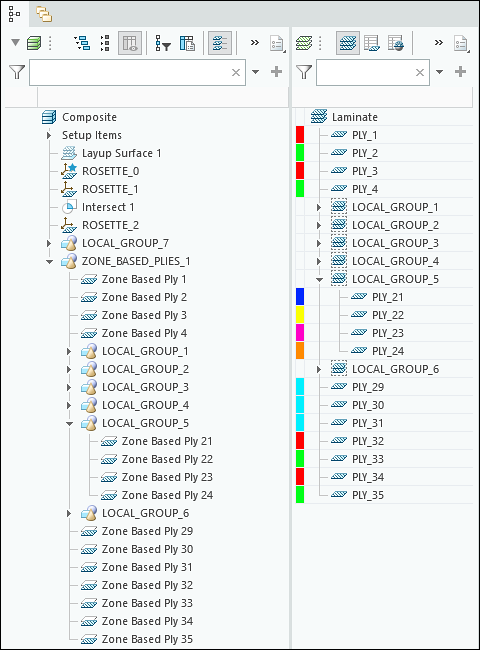
You can also manually ungroup and regroup the laminate objects.
To ungroup the laminate objects, do one of the following:
• Right-click the group in the Laminate Tree, and then select  Ungroup Laminate Objects from the shortcut menu.
Ungroup Laminate Objects from the shortcut menu.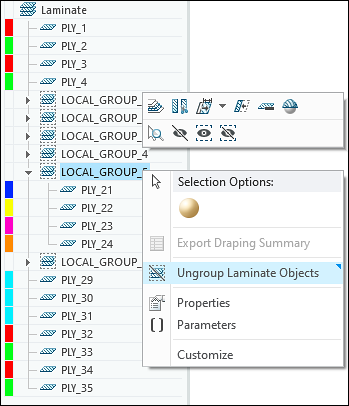
• Right-click the corresponding group in the Composite Tree, and then select Ungroup Laminate Objects from the shortcut menu.
Ungroup Laminate Objects from the shortcut menu.To regroup the laminate objects, do the following:
1. In the Composite Tree, right-click the group containing at least one feature that created a laminate object.
2. Select  Group Laminate Objects from the shortcut menu.
Group Laminate Objects from the shortcut menu.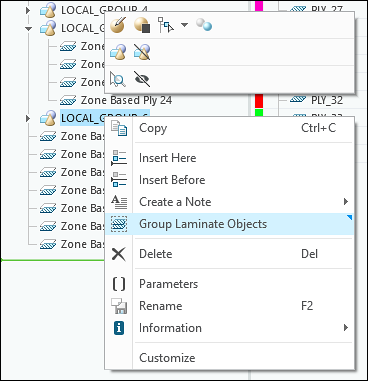
When you perform an action such as a splicing or draping simulation, you can select all laminate objects from a group at once by selecting the group. This eliminates the need to select each laminate object individually.
You can select or clear the Group Headers check box in the Laminate Tree Filters dialog box to control the display of group headers in the Laminate Tree.
Group Headers check box in the Laminate Tree Filters dialog box to control the display of group headers in the Laminate Tree.Benefits
This enhancement improves productivity and user experience. Grouping in the Laminate Tree simplifies selection and makes the model clearer and better organized.
Additional Information
Tips: | None. |
Limitations: | No known limitations. |
Does this replace existing functionality? | No. |
Configuration option associated with this functionality: | None. |