New CL Player for Synchronized NC Steps
Creo+
User Interface Location:
1. In a manufacturing assembly with synchronized assembly steps, select an operation on the Model Tree.
2. Select  Play Path on the mini toolbaar.
Play Path on the mini toolbaar.Videos
If the video does not play, watch it on YouTube.
Description
A new CL player has replaced the old and limited Menu Manager-based tool display for synchronized NC steps. This enhancement provides a modern CL player with extended capabilities for a full display of synchronized toolpaths without accessing the material simulation environment. The CL player provides a visual representation of the synchronized toolpaths. It also displays CL data of all heads to track line-by-line the execution of the synchronized toolpaths.
The new CL player provides support for the following:
• Solid tool display
• Step-by-step toolpath display
• Collision and gouge checks
Creo 9 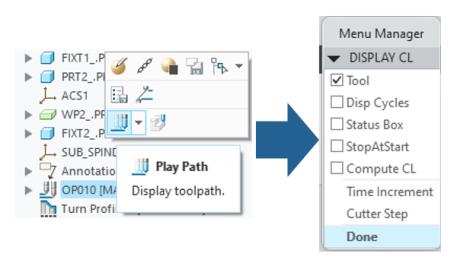 | Creo 10 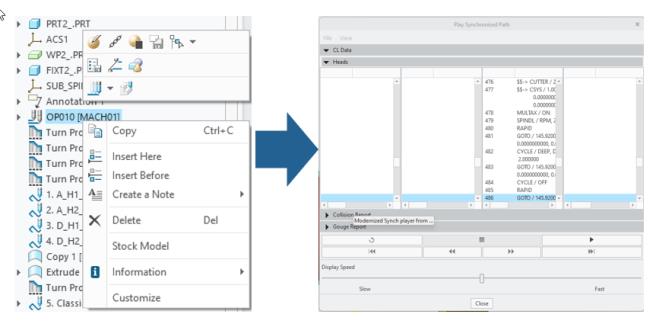 |
Benefits
The new CL player with the extended capabilities is a replacement of the old Menu Manager-based UI.
Additional Information
Tips: | None. |
Limitations: | No known limitations. |
Does this replace existing functionality? | Yes. |
Configuration option associated with this functionality: | mfg_new_cl_player_for_sync yes*, no |