Creo+ FAQ
The following are some questions a user may have when using Creo+ for the first time.
How can I tell which licenses I am entitled to?
To run Creo+ a user must have a License to Run and must also be a member of at least one profile. A user could also have Extension licenses.
A profile can have multiple floating licenses. The profile information includes the licenses available to all members of a profile.
To view your license entitlement open the PTC Control Center, click your initial at the top right corner to display your name, email, and a link to the details of your license entitlement.
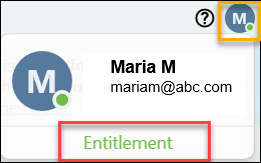
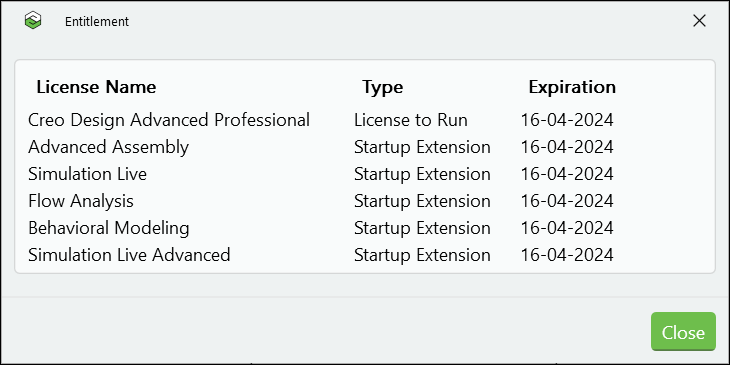
Click Entitlement to open the Entitlement box that displays your License to Run, and any Startup Extension licenses that you are entitled to, along with the expiration date for each license.
To view the floating licenses for a profile open the PTC Control Center, select a profile and then click  . The Profile dialog box displays the floating licenses available for the selected profile with their expiration date, as well as the settings for Creo+.
. The Profile dialog box displays the floating licenses available for the selected profile with their expiration date, as well as the settings for Creo+.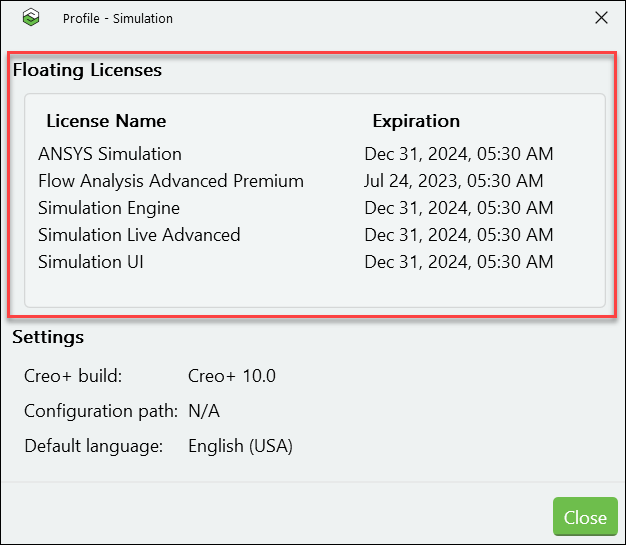
After I start a Creo+ session, how can I tell which profile it uses?
The Creo+ window displays the initials of the signed in user at the top-right corner of the window. Hover your pointer over the user’s initials to view the name of the user, email address, and the active profile for the session.
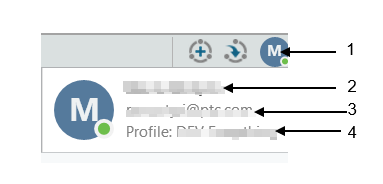
1. initials of the user
2. name of the user
3. email address of the user
4. active profile for the session
When I try to start a Creo+ application I get a message that I do not have access to the application. What should I do?
This means that the profile you selected when launching Creo+ does not have any licenses for that application.
From the PTC Control Center, select other profiles and then click to open the Profile information dialog box. Check if there is any other profile you have access to, that has a license for the application you want to work with. Select that profile when launching Creo+.
to open the Profile information dialog box. Check if there is any other profile you have access to, that has a license for the application you want to work with. Select that profile when launching Creo+.If none of your available profiles has a license for the application you require, contact your CAD Administrator.
If I have already launched Creo+ and I change the profile selection from the PTC Control Center will I lose the licenses for the current session?
No, you will not lose the license for the currently opened session. The profile that was selected when you launched Creo+ remains active until you exit. The new selection will be valid only when you launch a new session of Creo+.
How can I tell if I have the latest version of Creo+?
You can confirm the build version you are using in any of the following ways:
• From the PTC Control Center click  and then select About PTC Control Center. The build version is displayed in the information dialog box.
and then select About PTC Control Center. The build version is displayed in the information dialog box.• From Creo+—Click > > to see the version and build number that is installed on your machine.
At what File Path is the PTC Control Center installed on my machine?
The PTC Control Center is installed at <driveletter>:\Users\<username>\AppData\Local\Programs\PTC\Creo\ControlCenter
At what File Path is Creo+ installed on my machine?
Creo+ is installed at
<driveletter>:\Users\<username>\AppData\Local\Programs\PTC\Creo\CreoPlus_<Verion_number>-build.<build number>
How can I start Creo+ with a specific configuration?
Administrators define organization and profile configurations that are stored and retrieved from the Creo+ Portal. In addition each user can define their own user (personal) profile configurations which override the settings at the organization and profile level. See the topic Configuring Creo+
How can I view the configuration options for a specific profile?
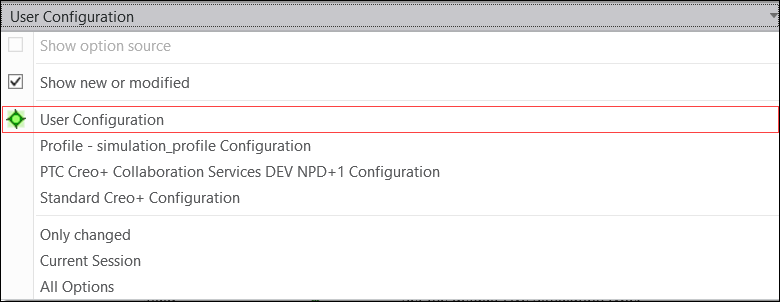
When you start Creo+, you select a profile and Creo+ opens with that profile. As a user you can only modify and change configurations for your user (personal) profile, but you can view the configuration settings for other available profiles. Click > > to open the Creo+ Options dialog box. Click Configuration Editor from the left pane. The Configuration Editor displays the options for the active profile. From the Show list you can select and view any of the other profile configurations such as the Organization configuration, the profile configuration that you opened Creo+ with, or the default Standard Creo+ profile configuration.
What happens if I have an active Creo+ session open, and I am removed from the profile? Do I lose my license immediately?
If you are removed from a profile and if you are running Creo+ at that time, you will receive a notification. You will have time to save your work and exit Creo+.
Can I run multiple Creo+ sessions with different profiles at the same time?
Yes, you can launch and run multiple Creo+ sessions together.