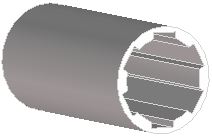
 Feather Key.
 Feather Key Groove Hub/Feather Key. The Keyway/hub dialog box opens.
 to complete the operation. Feather Key.
 Feather Key Boss. The Keyway/hub dialog box opens. to complete the operation.
 | To align the workplane with your hub part, 1. Maximize the TS-WP-POSITION viewport and make the hub part visible. 2. First, you need to move the workplane so it is parallel with the end face of the hub part: a. Click Par to Face and select the end face of the hub. b. Click Apply. 3. Now you need to align the profiles with the hub: a. Click Pos Dynamic. b. Select Mate Align in the Methods section. c. Select Align Axis. d. Select the circular construction geometry in the viewport (magenta color, by default). e. Select the cylindrical face on the hub. f. Click Done at the bottom of the dialog. 4. If you need to rotate the profiles, a. Click Rotate. b. Select the center of the profile(s) and turn into position. |