Create a Service Principal for Codebeamer(On-Premises) and Codebeamer+ Installations
A service principal, also known as a service account or application identity, is a security principle that is used for authentication and authorization in computer systems and networks.
Codebeamer AI leverages PTC SaaS services to deliver AI capabilities by using a service principal for each Codebeamer installation. The Codebeamer AI Plugin connects to the Codebeamer AI Service hosted on PTC’s SaaS platform in Microsoft Azure. Because this service is external, your Codebeamer instance must be internet-accessible, and secure authentication is required.
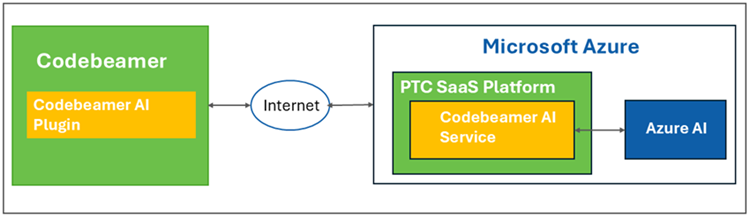
Service principals enable non-interactive, controlled access to Azure resources without exposing user credentials, ensuring security, compliance, and proper authorization for the integration.
To use the principal credentials to authenticate with supported PTC applications, you need to create a service principal. For information on creating and managing service principal, see Creating and Managing Service Principals.
1. Login to PTC Admin Center as an organization admin.
2. Create a service principal by following the steps detailed in the topic — Create a Service Principal.
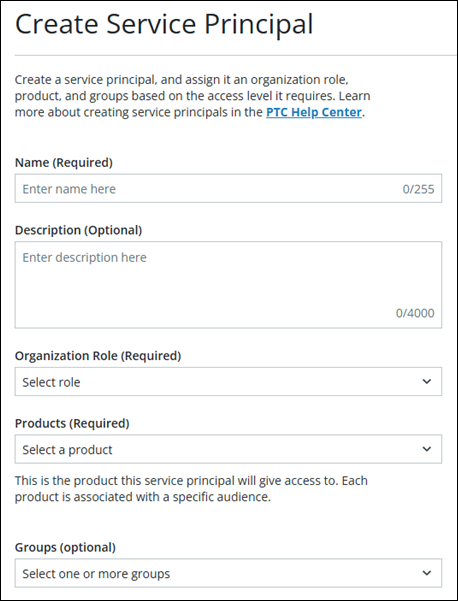
3. Specify the following details while creating the service principal:
◦ Name—Specify the name of the service principal. This name will be used to configure Codebeamer.
◦ Organization Role—Specify the Organization Role as Viewer.
◦ Products—Select Codebeamer.
Once the service principal is created, the Service Principal Created page opens with the details of the Client ID, Secret Key and Audience.
 |
• Make sure to copy and save the service principal credentials, as you will need them for integrating the AI services with Codebeamer.
• For PTC-hosted Codebeamer AI, you are required to share the Client ID and Client secret values with PTC for installing and configuring the Codebeamer AI plugin. For more information, see Enablement of Codebeamer AI Services for PTC Hosted Deployments.
|