 |
|
|
Copying features by Translating
You can use Copy and Paste Special to copy and translate features or a group. The Paste Special dialog box has options for Dependency, Move/Rotate, and Advanced Reference Configuration. |
|
| Task 2-39. Copy and translate features on the GLOW_PLUG_2.PRT. |
- Select the Folder Browser
 , and click Working Directory , and click Working Directory  . .
- Double-click GLOW_PLUG_2.PRT to open it.
- Create a round as shown in the following figure:
- Start the Round Tool
 from the feature toolbar. from the feature toolbar.
- Zoom in, then press CTRL and select the two edges shown (ignore the radius value).
- Right-click and select Full Round, then click Complete Feature
 . .
 
Creating a Full Round |
- With the last round still selected, press CTRL and select Round 1 and Revolve 2 from the model tree.
- Right-click and select Group.
- Create a copy as shown in the following figure:
- With the group still selected, click Copy
 from the main toolbar. from the main toolbar.
- Click Paste Special
 from the main toolbar. from the main toolbar.
- Select both Make Copies Dependent and Apply Move/Rotate Transformations. Click OK.
- Click Translate
 from the dashboard and select the top model surface. from the dashboard and select the top model surface.
- Enter -1.5 for the translate value and click Complete Feature .
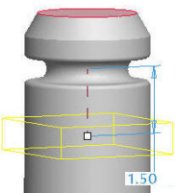 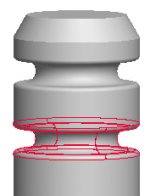
Creating a Copy |
- Click Save
 from the main toolbar, and click OK. from the main toolbar, and click OK.
- Click File > Close Window
 . . |


 Previous

