 |
|
|
Snapping to References
When dragging a depth or reference handle, you can 'snap' to references by pressing the SHIFT key. |
|
| Task 2-34. Create an extrude feature on the IMPELLER_2.PRT that will be used to create a pattern. |
- Click Open
 from the main toolbar, select IMPELLER_2.PRT, and click Open. from the main toolbar, select IMPELLER_2.PRT, and click Open.
- Select the BLADE_SKETCH from the model tree, then right-click and select Edit.
- Notice this sketch has no angle dimension to control the orientation of the sketch.
- With the sketch still selected, start the Extrude Tool
 from the feature toolbar. from the feature toolbar.
- Click Datum Planes
 to enable their display. to enable their display.
- Press SHIFT and drag the depth handle to snap to datum plane WIDTH.
- Click Solid
 and Thicken Sketch and Thicken Sketch  . Enter 1.5 for the thickness value. . Enter 1.5 for the thickness value.
- Click Change Material Direction
 twice to thicken towards the inside of the sketch. twice to thicken towards the inside of the sketch.
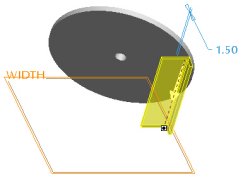
Creating a Thin Protrusion |
- Click Complete Feature
 . . |


 Previous

