 |
|
|
Creating Axis Patterns
The Axis pattern option can be used to rotationally pattern a feature or group about a selected axis, regardless of their dimensioning scheme. The Set Angular Extent option within Axis pattern eliminates the need to write a typical "Angle=360/P1" relation to equally space pattern members. |
|
| Task 2-35. Create pattern of equally spaced blades. |
- With the Extrude 2 feature still selected, right-click and select Pattern.
- Click Datum Axes
 to enable their display. to enable their display.
- Change the pattern type from Dimension to Axis, and select axis A_2.
- Drag the pattern spacing handle to 45 to view the effect on the pattern preview dots.
- Enter 6 as the number of members in the dashboard.
- Click Set Angular Extent
 in the dashboard. in the dashboard.
- Click Complete Feature
 . .
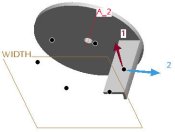 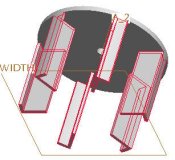
Pattern Created |
- Click Save
 from the main toolbar, and click OK. from the main toolbar, and click OK.
- Click File > Close Window
 . . |


 Previous

