Previous Page 49 of 89 Next
Information

Automatically Grouped Features

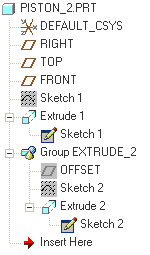
The datum plane and sketch have been automatically grouped with the Extrude feature.  These features are also automatically Hidden, so they will not clutter up the display.  Hidden features are 'grayed-out' in the model tree.

Task 2-20. Examine the resulting sketches and sketch-based features in the model tree.

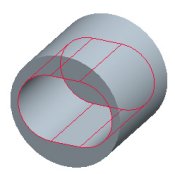
  1. Orient the model to view the created cut as shown in the following figure.
    1. Click Show > Expand All from the model tree.
    2. Notice that Extrude 1 is driven by Sketch 1, and that the original Sketch 1 is automatically hidden in the model tree.
    3. Notice that Extrude 2 has been automatically grouped with the OFFSET plane and Sketch 2, since the dashboard was paused during their creation. These features are also automatically hidden within the group.


Model and Model Tree

Previous Home Next