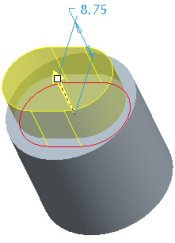
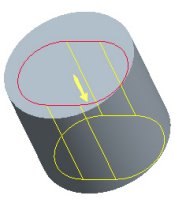
Now that the datum plane and sketch have been created, we will Resume the complete the Extrude feature, creating an oval cut that hollows out the PISTON.
Task 2-19. Complete the Extruded cut using the previous datum plane and sketch.
Click Saved View List from the main toolbar and select Standard Orientation.
Click Shading from the main toolbar.
Click Resume Feature from the dashboard.
Complete the extruded cut as shown in the following figure:
Click on the yellow arrow to flip the direction of feature creation downward.
Right-click on the depth handle and select Through All.
Right-click over the model and select Remove Material.
Click Complete Feature.
Creating an Extruded Cut
Many feature operations can be done by right clicking on drag handles or the model, or from the icons in the dashboard.


 Previous


 from the main toolbar and select Standard Orientation.
 from the main toolbar.
 from the dashboard.
 .
.